<?xml version="1.0" encoding="utf-8"?>
<feed xmlns="http://www.w3.org/2005/Atom">
  <title>Forefront.io</title>
  
  <link href="/atom.xml" rel="self"/>
  
  <link href="http://forefront.io/"/>
  <updated>2016-08-29T04:55:16.315Z</updated>
  <id>http://forefront.io/</id>
  
  <author>
    <name>Andrew Chalkley</name>
    
  </author>
  
  <generator uri="http://hexo.io/">Hexo</generator>
  
  <entry>
    <title>Internet of Things Intruder Detector</title>
    <link href="http://forefront.io/a/iot-intruder-detector/"/>
    <id>http://forefront.io/a/iot-intruder-detector/</id>
    <published>2016-08-28T07:00:00.000Z</published>
    <updated>2016-08-29T04:55:16.315Z</updated>
    
    <content type="html"><![CDATA[<h2 id="Overview"><a href="#Overview" class="headerlink" title="Overview"></a>Overview</h2><p>Want to receive a text if there’s a bump in the night? Want an SMS if your cat is drinking from the toilet again? Want to get a text if a snooping parent or sibling comes in your room? This is a project for you!</p>
<p>We’re going to use an ESP8266 based WiFi prototyping development board - the Adafruit Feather HUZZAH and IoT platform Losant to send an SMS when an intruder is detected.</p>
<p>If you’re not familiar with Losant, Losant provides a simple way for generating visualization of all your data from all of your Internet of Things devices in customizable dashboards. Losant also allows you to respond to events coming from your devices like sending you an email when one of your devices measures a low moisture reading for one of your plants. Or even better, when your moisture sensing device measures low moisture, Losant can send a command to the watering device to start the watering cycle. The great thing is that you can modify the logic of the interaction between the devices in the Losant web app without modifying a line of code on any of your devices. This can all be done through an intuitive UI. You’ll see that in action in this project.</p>
<h2 id="Bill-of-Materials"><a href="#Bill-of-Materials" class="headerlink" title="Bill of Materials"></a>Bill of Materials</h2><p>You’ll need the following components for this project.</p>
<ul>
<li><a href="https://www.adafruit.com/products/64" target="_blank" rel="external">Breadboard</a></li>
<li><a href="https://www.adafruit.com/products/2821" target="_blank" rel="external">Adafruit Feather HUZZAH</a></li>
<li><a href="https://www.adafruit.com/products/153" target="_blank" rel="external">Jumper wires</a></li>
<li><a href="http://www.frys.com/product/6726705" target="_blank" rel="external">Passive Infrared (PIR) Sensor</a> </li>
<li>Micro-USB cable</li>
<li>Any USB power supply</li>
</ul>
<h2 id="Services-Used"><a href="#Services-Used" class="headerlink" title="Services Used"></a>Services Used</h2><ul>
<li><a href="https://www.losant.com/" target="_blank" rel="external">Losant</a></li>
</ul>
<h2 id="Wiring"><a href="#Wiring" class="headerlink" title="Wiring"></a>Wiring</h2><p>A Passive Infrared (PIR) sensor works by detecting the infrared radiation from an object - like a human or animal. </p>
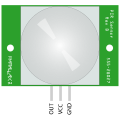
<p>Each PIR sensor can have different pin outs. I’m using the <a href="https://www.parallax.com/sites/default/files/downloads/555-28027-PIR-Sensor-Prodcut-Doc-v2.2.pdf" target="_blank" rel="external">Parallax 555-28027 PIR Sensor</a>. If you face the sensor toward you the pins from left to right are, out to signal, power and ground. <code>OUT</code> will send a <code>HIGH</code> signal once an infrared body is detected by the sensor. Here’s a illustration of the sensor and pin out.</p>
<p><img src="/attachments/iot-motion/pir.min.svg" alt="A graphic of the PIR sensor with the sensor facing toward the screen. At the bottom of the sensor there are 3 pins. Reading OUT, VCC and GND from left to right." width="50%"></p>
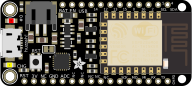
<p>Here’s what the Adafruit Feather HUZZAH looks like - big style!</p>
<p><img src="/attachments/iot-motion/feather-huzzah.min.svg" alt="A graphic of the Adafruit Feather HUZZAH" width="80%"></p>
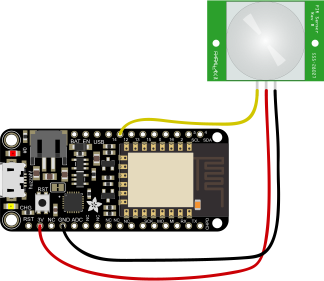
<p>Wire up the <code>VCC</code> on the PIR sensor to <code>3V</code> on the HUZZAH, the <code>GND</code> pin on the PIR sensor to the <code>GND</code> on the HUZZAH. The sensor should be working now. There’s a red LED that comes on when the sensor detects a body. Finally connect the <code>OUT</code> from the PIR sensor to any digital pin on the HUZZAH. I picked <code>12</code>. </p>
<p><img src="/attachments/iot-motion/wiring-motion-sensor.min.svg" alt="A graphic of the wiring for the PIR sensor to the Feather HUZZAH showing a yellow wire going from OUT on the PIR to pin 12 on the HUZZAH, a red wire going from VCC on the PIR to 3V on the Huzzah and a black wire connecting the GND pins on the PIR and HUZZAH." width="80%"></p>
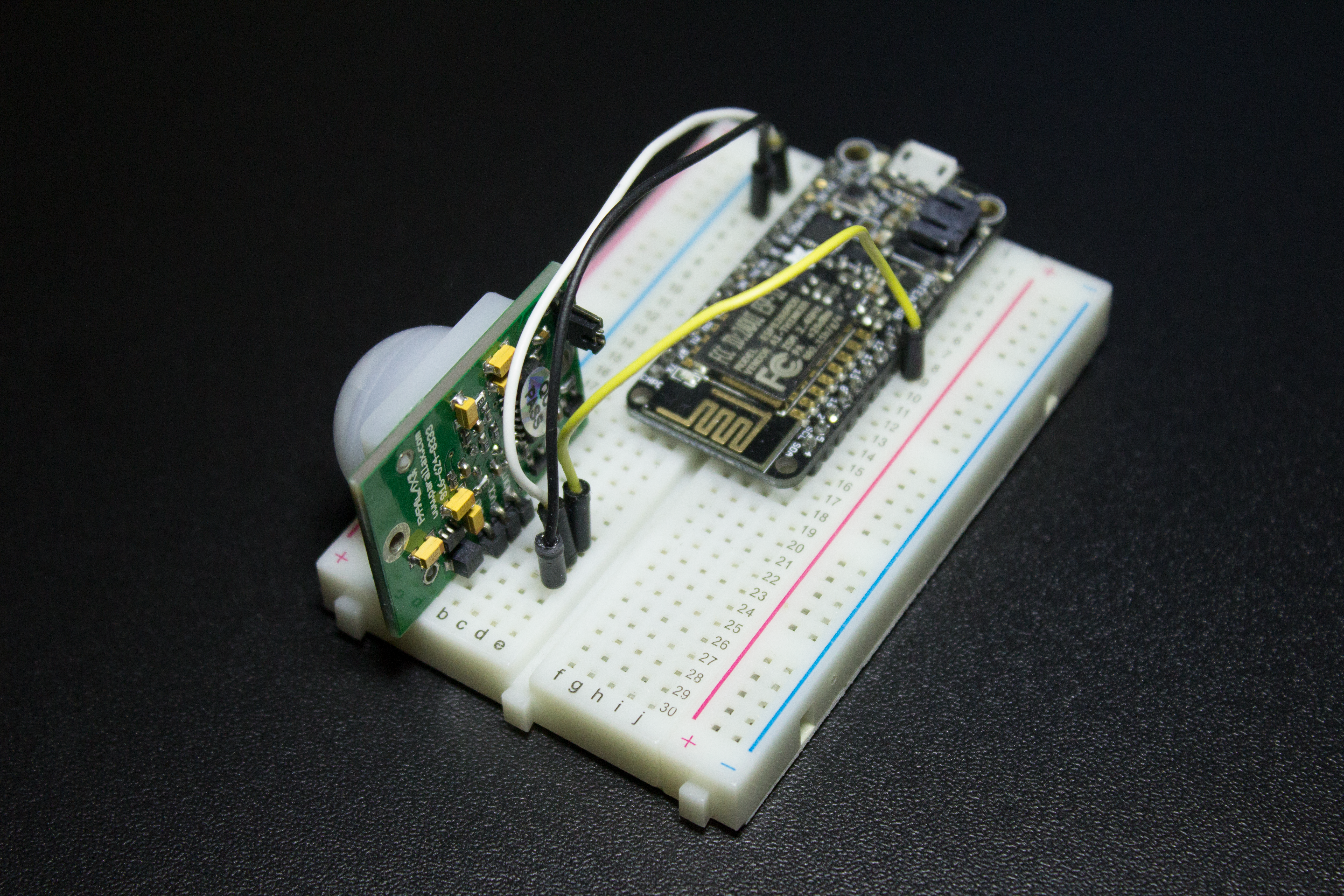
<p>Here’s how it looks <abbr title="In Real Life">IRL</abbr>.</p>
<p><img src="/attachments/iot-motion/irl.png" alt="A photo of a breadboard with a Adafruit Feather HUZZAH and PIR sensor connected. There's a white wire connecting power, black ground and yellow for OUT and 12."></p>
<p>For further reading on the PIR sensor visit the <a href="https://www.parallax.com/sites/default/files/downloads/555-28027-PIR-Sensor-Prodcut-Doc-v2.2.pdf" target="_blank" rel="external">Parallex Website</a> or Adafruit’s Learning System for the <a href="https://learn.adafruit.com/adafruit-feather-huzzah-esp8266" target="_blank" rel="external">Feather HUZZAH</a>.</p>
<h2 id="Arduino-Code"><a href="#Arduino-Code" class="headerlink" title="Arduino Code"></a>Arduino Code</h2><p>The Adafruit Feather HUZZAH is Arduino compatible, so we’ll be using the <a href="https://www.arduino.cc/en/Main/Software" target="_blank" rel="external">Arduino IDE</a>. If you’re new to Arduino you should check out <a href="http://forefront.io/a/beginners-guide-to-arduino/">The Absolute Beginner’s Guide to Arduino</a>.</p>
<p>The Arduino IDE doesn’t come working “out-of-the-box” with the Feather HUZZAH. To get it up and running take a quick detour to <a href="https://learn.adafruit.com/adafruit-io-basics-esp8266-arduino/overview?view=all#using-arduino-ide" target="_blank" rel="external">Adafruit’s Learning Guide</a>. When the IDE has been set up, let’s get ready to code.</p>
<p>Our Arduino code needs to do the following things:</p>
<ol>
<li>Connect and reconnect to WiFi (<code>connect()</code> and <code>reconnect()</code>)</li>
<li>Connect and reconnect to the Losant IoT platform  (<code>connect()</code> and <code>reconnect()</code>)</li>
<li>Read the PIR sensor (<code>int currentRead = digitalRead(MOTION_PIN);</code>)</li>
<li>Send a message to Losant when motion of an infrared body has been detected (<code>motionDetected()</code>)</li>
</ol>
<p>The Arduino code is below and requires the <a href="https://github.com/Losant/losant-mqtt-arduino" target="_blank" rel="external">Losant mqtt library for Arduino</a>. See the <a href="https://github.com/Losant/losant-mqtt-arduino/blob/master/README.md" target="_blank" rel="external">README.md</a> for other dependencies.</p>
<figure class="highlight cpp"><table><tr><td class="gutter"><pre><div class="line">1</div><div class="line">2</div><div class="line">3</div><div class="line">4</div><div class="line">5</div><div class="line">6</div><div class="line">7</div><div class="line">8</div><div class="line">9</div><div class="line">10</div><div class="line">11</div><div class="line">12</div><div class="line">13</div><div class="line">14</div><div class="line">15</div><div class="line">16</div><div class="line">17</div><div class="line">18</div><div class="line">19</div><div class="line">20</div><div class="line">21</div><div class="line">22</div><div class="line">23</div><div class="line">24</div><div class="line">25</div><div class="line">26</div><div class="line">27</div><div class="line">28</div><div class="line">29</div><div class="line">30</div><div class="line">31</div><div class="line">32</div><div class="line">33</div><div class="line">34</div><div class="line">35</div><div class="line">36</div><div class="line">37</div><div class="line">38</div><div class="line">39</div><div class="line">40</div><div class="line">41</div><div class="line">42</div><div class="line">43</div><div class="line">44</div><div class="line">45</div><div class="line">46</div><div class="line">47</div><div class="line">48</div><div class="line">49</div><div class="line">50</div><div class="line">51</div><div class="line">52</div><div class="line">53</div><div class="line">54</div><div class="line">55</div><div class="line">56</div><div class="line">57</div><div class="line">58</div><div class="line">59</div><div class="line">60</div><div class="line">61</div><div class="line">62</div><div class="line">63</div><div class="line">64</div><div class="line">65</div><div class="line">66</div><div class="line">67</div><div class="line">68</div><div class="line">69</div><div class="line">70</div><div class="line">71</div><div class="line">72</div><div class="line">73</div><div class="line">74</div><div class="line">75</div><div class="line">76</div><div class="line">77</div><div class="line">78</div><div class="line">79</div><div class="line">80</div><div class="line">81</div><div class="line">82</div><div class="line">83</div><div class="line">84</div><div class="line">85</div><div class="line">86</div><div class="line">87</div><div class="line">88</div><div class="line">89</div><div class="line">90</div><div class="line">91</div></pre></td><td class="code"><pre><div class="line"><span class="meta">#<span class="meta-keyword">include</span> <span class="meta-string">&lt;ESP8266WiFi.h&gt;</span></span></div><div class="line"><span class="meta">#<span class="meta-keyword">include</span> <span class="meta-string">&lt;Losant.h&gt;</span></span></div><div class="line"></div><div class="line"><span class="comment">// WiFi credentials</span></div><div class="line"><span class="keyword">const</span> <span class="keyword">char</span>* WIFI_SSID = <span class="string">"&lt;YOUR SSID&gt;"</span>;</div><div class="line"><span class="keyword">const</span> <span class="keyword">char</span>* WIFI_PASS = <span class="string">"&lt;YOUR PASSWORD&gt;"</span>;</div><div class="line"></div><div class="line"><span class="comment">// Losant credentials</span></div><div class="line"><span class="keyword">const</span> <span class="keyword">char</span>* LOSANT_DEVICE_ID = <span class="string">"&lt;LOSANT_DEVICE_ID&gt;"</span>;</div><div class="line"><span class="keyword">const</span> <span class="keyword">char</span>* LOSANT_ACCESS_KEY = <span class="string">"&lt;LOSANT ACCESS KEY&gt;"</span>;</div><div class="line"><span class="keyword">const</span> <span class="keyword">char</span>* LOSANT_ACCESS_SECRET = <span class="string">"&lt;LOSANT ACCESS SECRET&gt;"</span>;</div><div class="line"></div><div class="line"><span class="keyword">const</span> <span class="keyword">int</span> MOTION_PIN = <span class="number">12</span>;</div><div class="line"></div><div class="line"><span class="keyword">int</span> motionState = <span class="number">0</span>;</div><div class="line"></div><div class="line">WiFiClientSecure wifiClient;</div><div class="line"></div><div class="line"><span class="function">LosantDevice <span class="title">device</span><span class="params">(LOSANT_DEVICE_ID)</span></span>;</div><div class="line"></div><div class="line"><span class="comment">// Connect to WiFi</span></div><div class="line"><span class="function"><span class="keyword">void</span> <span class="title">connect</span><span class="params">()</span> </span>&#123;</div><div class="line">  WiFi.begin(WIFI_SSID, WIFI_PASS);</div><div class="line"></div><div class="line">  <span class="keyword">while</span>(WiFi.status() != WL_CONNECTED) &#123;</div><div class="line">    delay(<span class="number">500</span>);</div><div class="line">  &#125;</div><div class="line"></div><div class="line">  device.connectSecure(wifiClient, LOSANT_ACCESS_KEY, LOSANT_ACCESS_SECRET);</div><div class="line"></div><div class="line">  <span class="keyword">unsigned</span> <span class="keyword">long</span> connectionStart = millis();</div><div class="line">  <span class="keyword">while</span>(!device.connected()) &#123;</div><div class="line">    delay(<span class="number">500</span>);</div><div class="line">    <span class="comment">// If we can't connect after 5 seconds, restart the board.</span></div><div class="line">    <span class="keyword">if</span>(millis() - connectionStart &gt; <span class="number">5000</span>) &#123;</div><div class="line">      <span class="comment">// Failed to connect to Losant, restarting board.</span></div><div class="line">      ESP.restart();</div><div class="line">    &#125;</div><div class="line">  &#125;</div><div class="line"></div><div class="line">  <span class="comment">//Device should be connected now and is now ready for use!</span></div><div class="line">&#125;</div><div class="line"></div><div class="line"><span class="comment">// Reconnects if required </span></div><div class="line"><span class="function"><span class="keyword">void</span> <span class="title">reconnect</span><span class="params">()</span> </span>&#123;</div><div class="line"> <span class="keyword">bool</span> toReconnect = <span class="literal">false</span>;</div><div class="line"></div><div class="line">  <span class="comment">// If the WiFi or HUZZAH is not connected to Losant - we should reconnect</span></div><div class="line">  <span class="keyword">if</span>(WiFi.status() != WL_CONNECTED || !device.connected()) &#123;</div><div class="line">    toReconnect = <span class="literal">true</span>;</div><div class="line">  &#125;</div><div class="line"></div><div class="line">  <span class="keyword">if</span>(toReconnect) &#123;</div><div class="line">    connect();</div><div class="line">  &#125;</div><div class="line">&#125;</div><div class="line"></div><div class="line"></div><div class="line"><span class="function"><span class="keyword">void</span> <span class="title">motionDetected</span><span class="params">()</span> </span>&#123;</div><div class="line">  <span class="comment">// Losant uses a JSON protocol. Construct the simple state object.</span></div><div class="line">  <span class="comment">// &#123; "motion" : true &#125;</span></div><div class="line">  StaticJsonBuffer&lt;<span class="number">200</span>&gt; jsonBuffer;</div><div class="line">  JsonObject&amp; root = jsonBuffer.createObject();</div><div class="line">  root[<span class="string">"motion"</span>] = <span class="literal">true</span>;</div><div class="line"></div><div class="line">  <span class="comment">// Send the state to Losant.</span></div><div class="line">  device.sendState(root);</div><div class="line">&#125;</div><div class="line"></div><div class="line"><span class="function"><span class="keyword">void</span> <span class="title">setup</span><span class="params">()</span> </span>&#123;</div><div class="line">  pinMode(MOTION_PIN, INPUT);</div><div class="line">  connect();</div><div class="line">&#125;</div><div class="line"></div><div class="line"><span class="function"><span class="keyword">void</span> <span class="title">loop</span><span class="params">()</span> </span>&#123;</div><div class="line">  reconnect();</div><div class="line">  device.loop();</div><div class="line"></div><div class="line">  <span class="comment">// Read the sensor</span></div><div class="line">  <span class="keyword">int</span> currentRead = digitalRead(MOTION_PIN);</div><div class="line"></div><div class="line">  <span class="comment">// If motion is detected we don't want to 'spam' the service</span></div><div class="line">  <span class="keyword">if</span>(currentRead != motionState) &#123;</div><div class="line">    motionState = currentRead;</div><div class="line">    <span class="keyword">if</span>(motionState) &#123;</div><div class="line">      motionDetected();</div><div class="line">    &#125;</div><div class="line">  &#125;</div><div class="line"></div><div class="line">  delay(<span class="number">100</span>);</div><div class="line">&#125;</div></pre></td></tr></table></figure>
<p>Fill in your SSID for <code>WIFI_SSID</code> and WiFi password for <code>WIFI_PASS</code>.</p>
<p>This only leaves the Losant credentials.</p>
<h2 id="Setting-up-Losant"><a href="#Setting-up-Losant" class="headerlink" title="Setting up Losant"></a>Setting up Losant</h2><p>To connect to Losant you require 3 things:</p>
<ol>
<li>A <em>Device ID</em> to identify the device from another device (<code>LOSANT_DEVICE_ID</code>)</li>
<li>An access key (<code>LOSANT_ACCESS_KEY</code>)</li>
<li>An access secret (<code>LOSANT_ACCESS_SECRET</code>)</li>
</ol>
<p>If you haven’t signed up to Losant yet, do that now at <a href="http://losant.com" target="_blank" rel="external">Losant.com</a> - it’s free for our use case.</p>
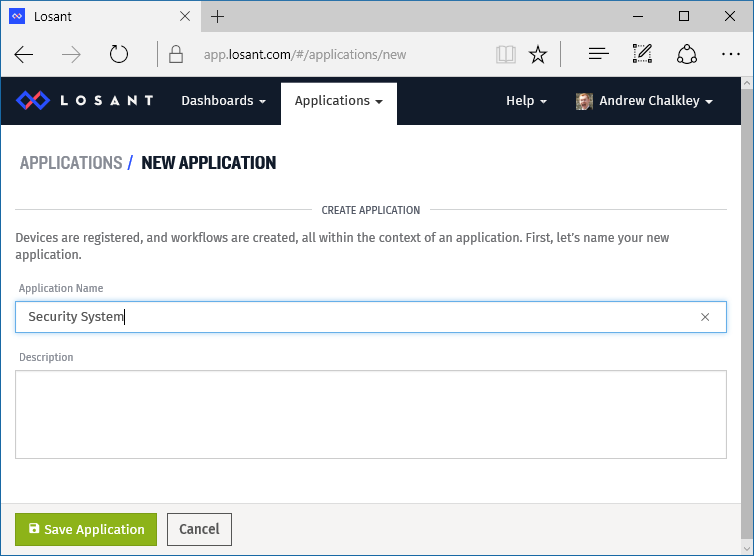
<p>First we need to create an application by going to <strong>Applications</strong> &gt; <strong>+ Create Application</strong> from the drop down menus.</p>
<p>I’m calling mine <strong>Security System</strong>.</p>
<p><img src="/attachments/iot-motion/create_application.png" alt="Screenshot of a web form containing an application name and description field. Application name has the words &#39;Security System&#39; entered in."></p>
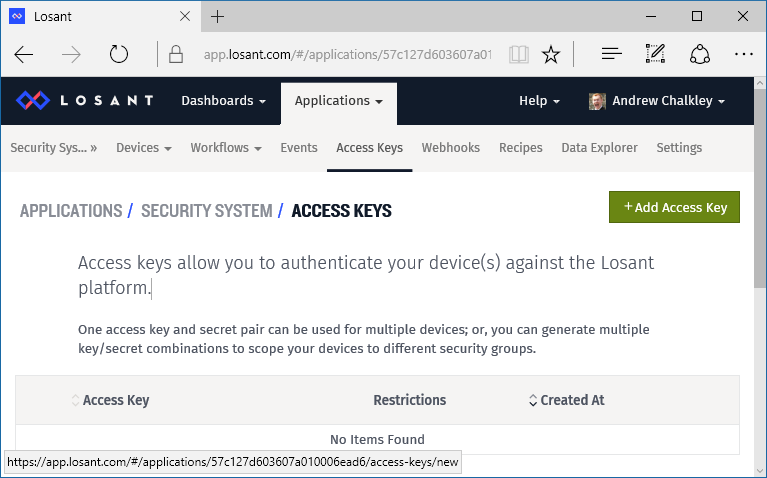
<p>Now we can create an Access Key. Visit the <strong>Access Keys</strong> link, then <strong>+ Add Access Key</strong>.</p>
<p><img src="/attachments/iot-motion/access-key.png" alt="Screenshot showing the Add Access Key button screen"></p>
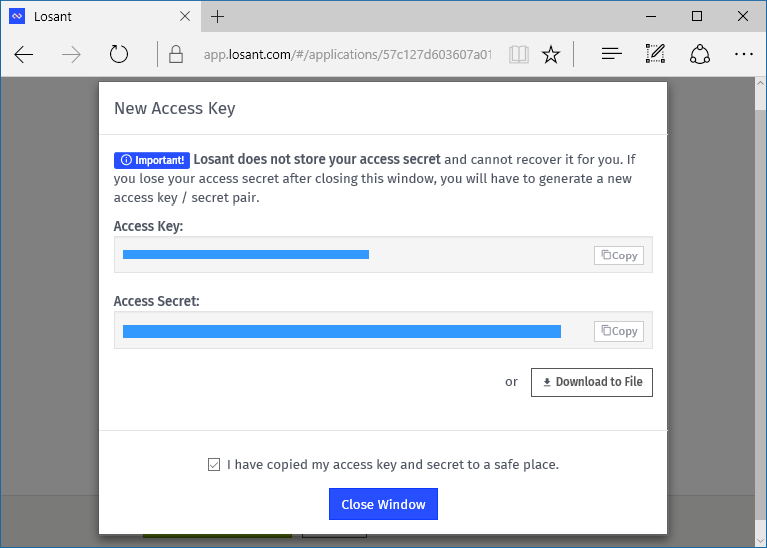
<p>Then, simply press <strong>Create Access Key</strong> for <em>All Devices</em>. You’ll be presented with an Access Key and Access Secret. These will be <code>LOSANT_ACCESS_KEY</code> and <code>LOSANT_ACCESS_SECRET</code> respectively in your Arduino code. Keep your secret safe. If you loose it you have to regenerate it and update all your devices with the new secret.</p>
<p><img src="/attachments/iot-motion/access_key_and_secret.png" alt="Screenshot showing the access key and secret obscured by blue bars"></p>
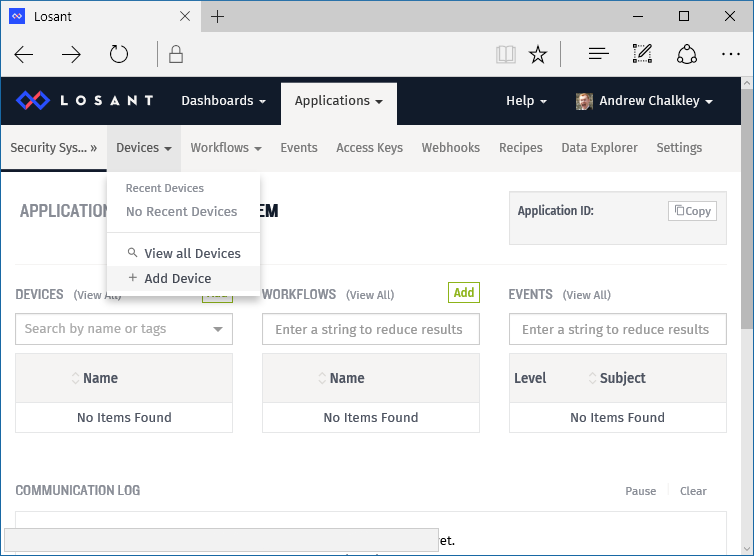
<p>Now we need to create a device to get a <em>Device ID</em> to put in to our Aruino code to assign to the <code>LOSANT_DEVICE_ID</code> constant.</p>
<p><img src="/attachments/iot-motion/device-menu.png" alt="Screenshot showing the menu for creating a device"></p>
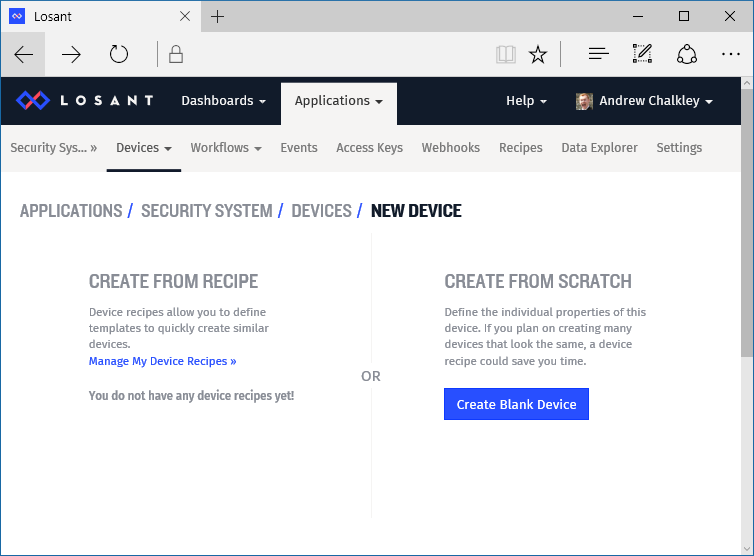
<p>Then click on <strong>Create Blank Device</strong>. </p>
<p><img src="/attachments/iot-motion/blank.png" alt="Screenshot showing the Create Blank Device"></p>
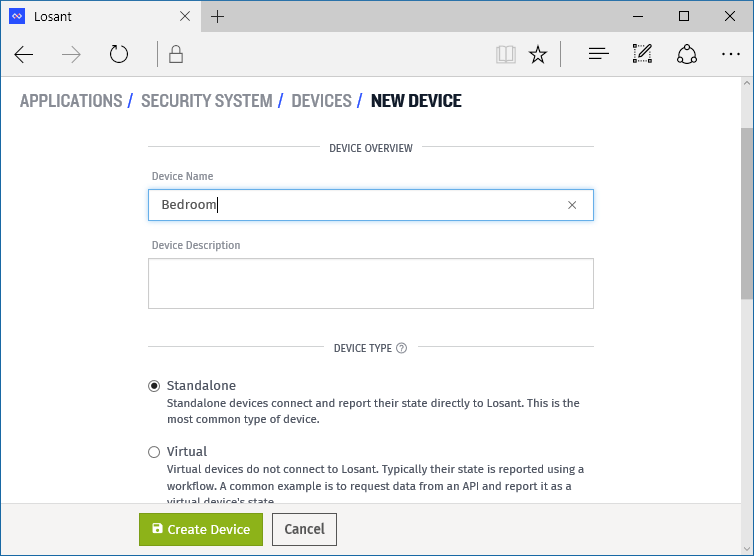
<p>Then we can create a new device. Let’s give the device a <em>Name</em> of <code>Bedroom</code> since this is going to be where the device will be. Then keep the <em>Device Type</em> set to <em>Standalone</em>, since it connects directly to Losant.</p>
<p><img src="/attachments/iot-motion/new-device.png" alt="Screenshot showing the a web form with Device Name filled in with &#39;Bedroom&#39; and Device Type set to &#39;Standalone&#39;"></p>
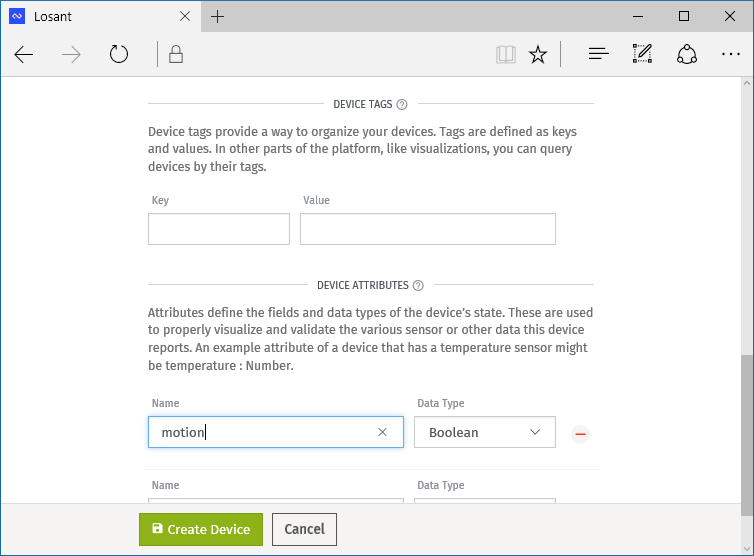
<p>Then you can specify the <em>Device Attributes</em> that the device will send to Losant. In our case it’s a boolean value of <code>motion</code>. You can have as many device attributes as you’d like, like a temperature reading or humidity reading. Device attributes are contained in the JSON that we send from the device in the <code>motionDetected()</code> function to Losant.</p>
<p><img src="/attachments/iot-motion/device-attributes.png" alt="Screenshot showing the a web form with a Device Attribute named &#39;motion&#39; set to the Data Type &#39;Boolean&#39;"></p>
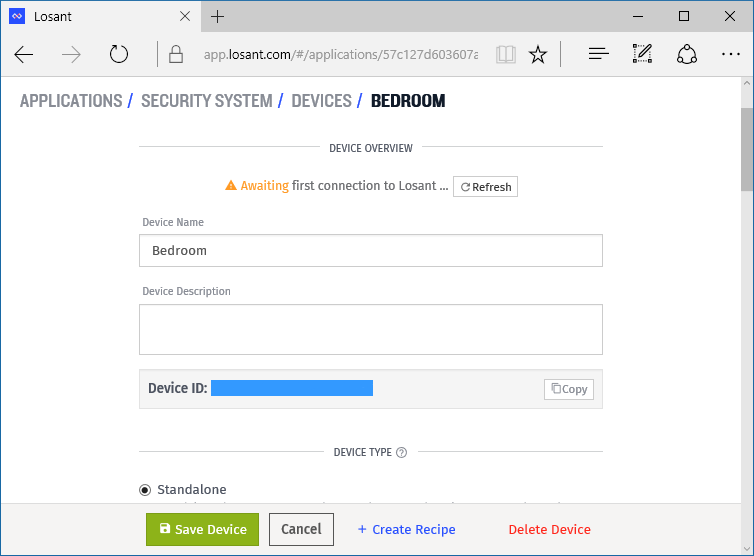
<p>Then click <strong>Create Device</strong>. You’ll now get a <em>Device ID</em>. You can copy and paste that for your <code>LOSANT_DEVICE_ID</code>.</p>
<p><img src="/attachments/iot-motion/bedroom-device-id.png" alt="Screenshot showing the new Device ID"></p>
<p>Awesome, we have all the required strings for the Arduino Skecth. Update the values for <code>LOSANT_DEVICE_ID</code>, <code>LOSANT_ACCESS_KEY</code> and <code>LOSANT_ACCESS_SECRET</code> and <em>Upload</em> your Arduino Sketch to the Adafruit Feather HUZZAH.</p>
<p>The final step is to get Losant to send us a text message when the motion state is <code>true</code>. To do this we need to create a <em>Workflow</em>. A <em>Workflow</em> is work triggered by your device’s states. In our case we want Losant to send an SMS message (the work) when the <code>motion</code> event occurs and is the value of <code>true</code>.</p>
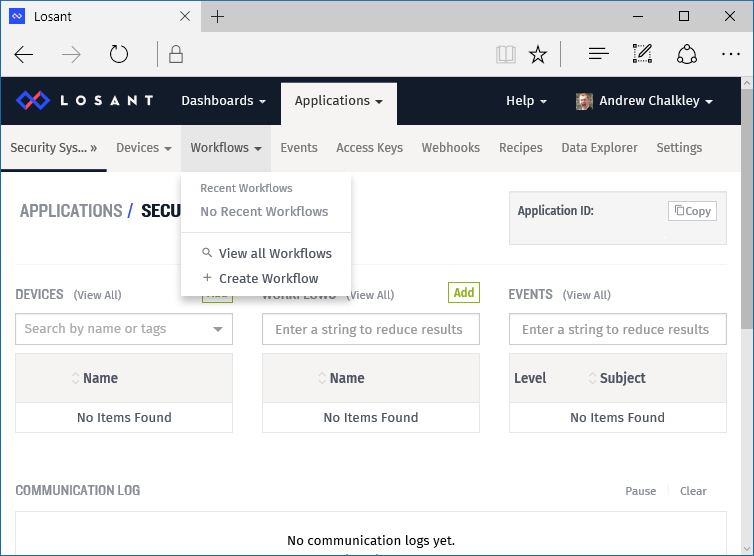
<p>Create a Workflow from the drop down menus.</p>
<p><img src="/attachments/iot-motion/workflow-menu.png" alt="Screenshot showing the menu for creating a workflow"></p>
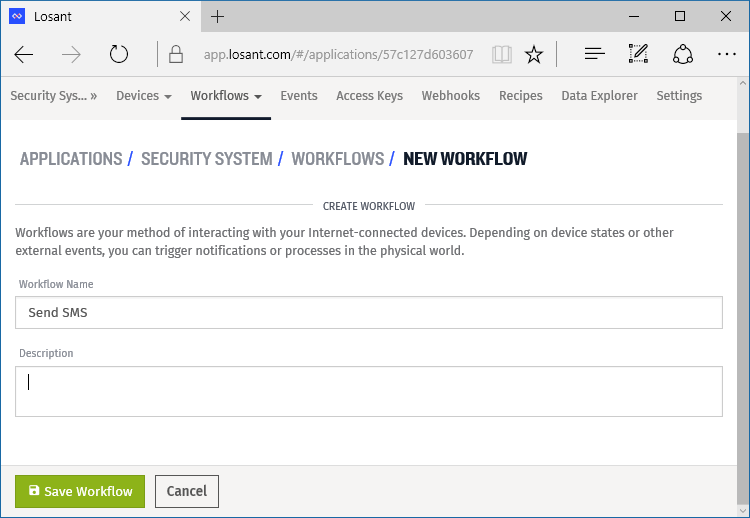
<p>Enter in a <em>Workflow Name</em> like <em>Send Notification</em> or <em>Send SMS</em> and press <strong>Save Workflow</strong>.</p>
<p><img src="/attachments/iot-motion/create-workflow.png" alt="Screenshot showing a web form with the text Send SMS in a &#39;Workflow Name&#39; field"></p>
<p>You are now presented with a simple drag and drop interface to create your workflow. First drag <em>Device</em> from <em>Triggers</em> in to the grid in the center of the screen.</p>
<video controls autoplay loop><br>  <source src="/attachments/iot-motion/drag-device.mp4" type="video/mp4"><br>  Your browser does not support the video tag.<br></video> 

<p>Then drag <em>Conditional</em> from the <em>Logic</em> panel.</p>
<video controls autoplay loop><br>  <source src="/attachments/iot-motion/drag-conditional.mp4" type="video/mp4"><br>  Your browser does not support the video tag.<br></video> 

<p>We then want to add the expression of…</p>
<pre><code>{{ data.motion }} == true
</code></pre><p>…in the <em>Expression</em> section of the <em>Conditional</em> panel.</p>
<video controls autoplay loop><br>  <source src="/attachments/iot-motion/expression.mp4" type="video/mp4"><br>  Your browser does not support the video tag.<br></video> 

<p>Now let’s drag <em>SMS</em> from the <em>Output</em> section and type in your cell phone number in the <em>Phone Number Template</em>.</p>
<video controls autoplay loop><br>  <source src="/attachments/iot-motion/drag_enter_phone_number.mp4" type="video/mp4"><br>  Your browser does not support the video tag.<br></video> 

<p>Then connect the nodes of the workflow together. Be sure to connect the green connection point on the <em>Conditional</em> to the <em>SMS</em> node. This means the condition has evaluated to true.</p>
<video controls autoplay loop><br>  <source src="/attachments/iot-motion/connect-the-flow.mp4" type="video/mp4"><br>  Your browser does not support the video tag.<br></video> 

<p>Oh, let’s not forget to include a <em>Message Template</em> of <code>Motion Detected!</code>.</p>
<video controls autoplay loop><br>  <source src="/attachments/iot-motion/message-contents.mp4" type="video/mp4"><br>  Your browser does not support the video tag.<br></video> 

<p>Finally, we <strong>Deploy Workflow</strong>, meaning it’s ready to work when events come in.</p>
<p>Unplug your device and set it up where you want to have it.</p>
<p>Now it’s time to see if it works!</p>
<video controls autoplay loop><br>  <source src="/attachments/iot-motion/its-alive.mp4" type="video/mp4"><br>  Your browser does not support the video tag.<br></video> 

<p>And it does! Awesome!</p>
<h2 id="Conclusion"><a href="#Conclusion" class="headerlink" title="Conclusion"></a>Conclusion</h2><p>Losant limits the SMS service to 1 per minute, which is fine for our purposes, but you can integrate with third party services such as telecom API provider Twilio which doesn’t have that restriction. </p>
<p>Taking the project further, you may want to add a button to “Arm” the device, with an LED indicator, so it doesn’t send the motion detection JSON when you’re expecting movement. </p>
<p>If you like this project why not give it some <em>Respect</em> on <a href="https://www.hackster.io/chalkers/internet-of-things-intruder-detector-e45246" target="_blank" rel="external">Hackster.io</a>?</p>
]]></content>
    
    <summary type="html">
    
      &lt;h2 id=&quot;Overview&quot;&gt;&lt;a href=&quot;#Overview&quot; class=&quot;headerlink&quot; title=&quot;Overview&quot;&gt;&lt;/a&gt;Overview&lt;/h2&gt;&lt;p&gt;Want to receive a text if there’s a bump in th
    
    </summary>
    
    
      <category term="Arduino" scheme="http://forefront.io/tags/Arduino/"/>
    
      <category term="PIR Sensor" scheme="http://forefront.io/tags/PIR-Sensor/"/>
    
      <category term="Internet of Things" scheme="http://forefront.io/tags/Internet-of-Things/"/>
    
      <category term="Losant" scheme="http://forefront.io/tags/Losant/"/>
    
      <category term="ESP8266" scheme="http://forefront.io/tags/ESP8266/"/>
    
  </entry>
  
  <entry>
    <title>Introducing Flasher.js</title>
    <link href="http://forefront.io/a/introducing-flasher-js/"/>
    <id>http://forefront.io/a/introducing-flasher-js/</id>
    <published>2016-07-06T07:00:00.000Z</published>
    <updated>2016-08-28T20:43:02.963Z</updated>
    
    <content type="html"><![CDATA[<p>The Internet of Things has the opportunity to tap into the talent of millions of web developers, <strong>today</strong>. It fails to do so because of friction.</p>
<p>If the tools don’t improve it will never happen. I hate seeing wasted potential. I want to see what people can create given familiar tools - JavaScript, in a modern workflow.</p>
<p><img src="/attachments/flasherjs-logo.png" width="256px" alt="Flasher.js Logo - Credit: Mat Helme"></p>
<p>Today marks our first step toward breaking down those barriers into IoT development with the release of <strong>Flasher.js</strong>. <strong>Flasher.js</strong> is the first development tool by <a href="http://thingssdk.com" target="_blank" rel="external">thingsSDK</a>. </p>
<p><strong>thingsSDK</strong>‘s mission is to create a set of common APIs for Internet of Things devices in JavaScript. Ideally, the APIs could be reimplemented on any embedded JavaScript runtime or even in Node.js. The first step is making it easy getting JavaScript on to cheap, affordable microcontrollers. Then, provide the APIs and a modern workflow. </p>
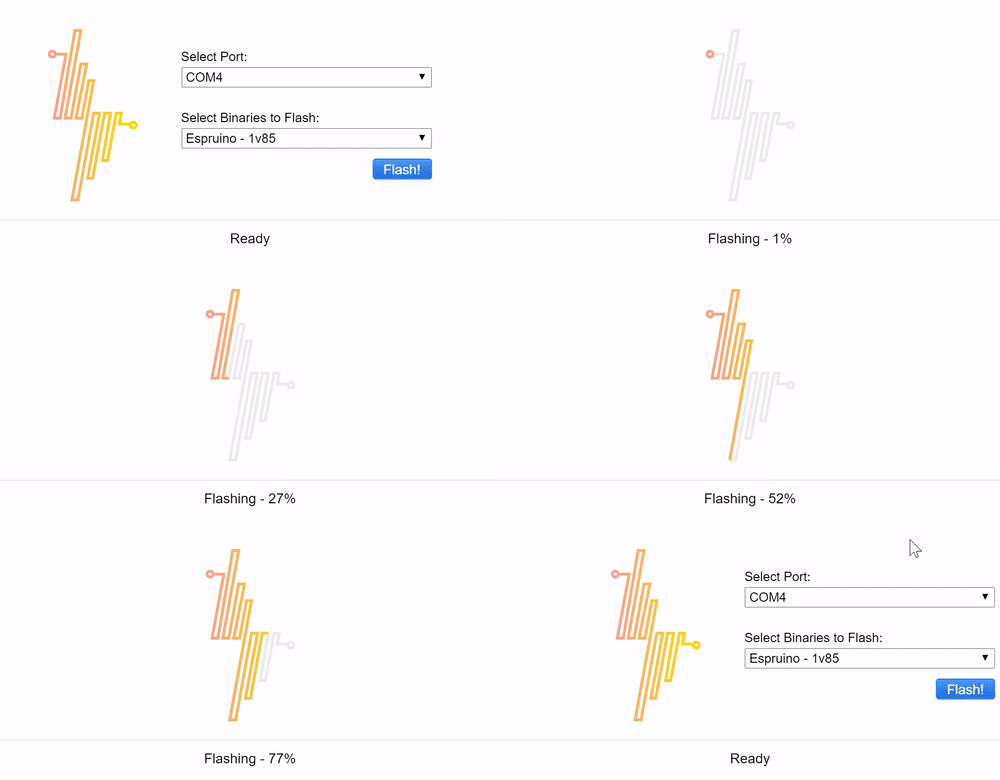
<p><strong>Flasher.js</strong> is a simple cross-platform app that allows you to install JavaScript runtimes (and others) to ESP8266 WiFi enabled microcontrollers.</p>
<p><img alt="Flasher.js in action (2x speed)" src="/attachments/flasher.js.gif" class="highlight"></p>
<h2 id="Downloads"><a href="#Downloads" class="headerlink" title="Downloads"></a>Downloads</h2><p>Download it now!</p>
<ul>
<li><a href="https://github.com/thingsSDK/flasher.js/releases/download/1.0.0/Flasher.js-Windows-1.0.0.exe" target="_blank" rel="external">Windows</a></li>
<li><a href="https://github.com/thingsSDK/flasher.js/releases/download/1.0.0/Flasher.js-Mac-1.0.0.dmg" target="_blank" rel="external">Mac</a></li>
<li><a href="https://github.com/thingsSDK/flasher.js/releases/download/1.0.0/Flasher.js-Linux-1.0.0.deb" target="_blank" rel="external">Linux</a></li>
</ul>
<h2 id="Compatibility"><a href="#Compatibility" class="headerlink" title="Compatibility"></a>Compatibility</h2><p>This should work on all ESP8266 (ESP-12) development boards. A list of tested boards are below:</p>
<ul>
<li><a href="https://www.adafruit.com/products/2821" target="_blank" rel="external">Adafruit Feather HUZZAH</a> - $15.95</li>
<li><a href="https://www.adafruit.com/products/2471" target="_blank" rel="external">Adafruit HUZZAH</a> - $9.95</li>
<li><a href="http://www.banggood.com/V3-NodeMcu-Lua-WIFI-Development-Board-p-992733.html" target="_blank" rel="external">NodeMCU V3</a> - $6.40</li>
<li><a href="http://www.aliexpress.com/item/Smart-Electronics-ESP8266-serial-WIFI-Witty-cloud-Development-Board-ESP-12F-module-MINI-nodemcu/32597903268.html" target="_blank" rel="external">WiFi Witty</a> - $2.78</li>
</ul>
<p>Many thanks to <a href="https://twitter.com/craigsdennis" target="_blank" rel="external">Craig Dennis</a> who did the heavy lifting writing the internal module that flashes the device and <a href="https://twitter.com/mathelme" target="_blank" rel="external">Mat Helme</a> for the logo and UI designs.</p>
<h2 id="Helping-Out"><a href="#Helping-Out" class="headerlink" title="Helping Out"></a>Helping Out</h2><p><strong>Flasher.js</strong> is open source if you’d like to help write documentation, test devices, write tests and add improvements come join us on <a href="https://github.com/thingsSDK/flasher.js" target="_blank" rel="external">GitHub</a>. Also, consider joining us on the <a href="https://jsot-slack.herokuapp.com" target="_blank" rel="external">JavaScript and the Internet of Things Slack</a>.</p>
]]></content>
    
    <summary type="html">
    
      &lt;p&gt;The Internet of Things has the opportunity to tap into the talent of millions of web developers, &lt;strong&gt;today&lt;/strong&gt;. It fails to do s
    
    </summary>
    
    
      <category term="ESP8266" scheme="http://forefront.io/tags/ESP8266/"/>
    
      <category term="Espruino" scheme="http://forefront.io/tags/Espruino/"/>
    
      <category term="JavaScript" scheme="http://forefront.io/tags/JavaScript/"/>
    
  </entry>
  
  <entry>
    <title>The Origins of &quot;Broken&quot; Computers (and Software)</title>
    <link href="http://forefront.io/a/origins-of-broken-computers/"/>
    <id>http://forefront.io/a/origins-of-broken-computers/</id>
    <published>2016-01-15T08:00:00.000Z</published>
    <updated>2016-08-28T20:43:02.990Z</updated>
    
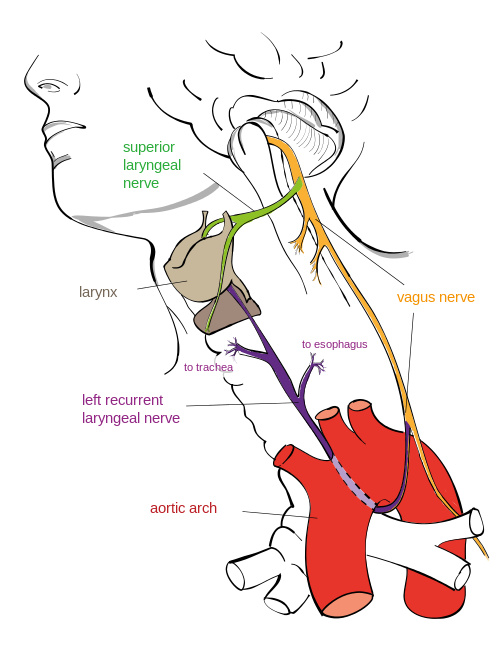
    <content type="html"><![CDATA[<h2 id="Organisms-by-Means-of-Natural-Selection"><a href="#Organisms-by-Means-of-Natural-Selection" class="headerlink" title="Organisms by Means of Natural Selection"></a>Organisms by Means of Natural Selection</h2><p>A common misconception with evolution comes from the phrase “survival of the fittest”. It doesn’t mean the fastest or the strongest organism. It’s not about it’s fitness on the race track, it’s about it’s ability to fit in to it’s environment. Whilst some adaptations seem extremely fine tuned, a closer look reveals that organisms have bizarre features and traits. For example the <strong><a href="https://en.wikipedia.org/wiki/Recurrent_laryngeal_nerve" target="_blank" rel="external">recurrent laryngeal nerve</a></strong>.</p>
<p><img src="../../attachments/origins/500px-Recurrent_laryngeal_nerve.png" alt=""><a href="https://en.wikipedia.org/wiki/File:Recurrent_laryngeal_nerve.svg" target="_blank" rel="external">Image by Jkwchui - Creative Commons Attribution-Share Alike 3.0 Unported</a></p>
<p>The recurrent laryngeal nerve, branches off from the vagus nerve that sprouts out of the back of a head. Instead of branching off and going directly to the larynx (the voice box), it takes a tour down to the chest, loops under the aortic arch and travels back up to the larynx. This <em>could</em> sprout out earlier and take a direct route to the larynx, but it doesn’t. </p>
<p>In fact it’s true for the the <a href="https://en.wikipedia.org/wiki/Giraffe#Internal_systems" target="_blank" rel="external">Giraffe too</a>.</p>
<p><img src="../../attachments/origins/giraffe_drinking.jpg" alt=""><a href="https://en.wikipedia.org/wiki/File:Flickr_-_Rainbirder_-_Reticulated_Giraffe_drinking.jpg" target="_blank" rel="external">Steve Garvie - Attribution-Share Alike 2.0 Generic</a></p>
<p>Instead of being a direct 2 inches in length, it’s over several feet. No engineer would ever design a system like that…right? So why is it there? History and legacy. </p>
<p>In our fish-like ancestors the brain, the gills and heart were close together. It was more direct for the laryngeal-equivalent nerve to go from the brain to the gills. But over time, gradually, as the biology of the fish turned in to the biology of a mammal and the neck began to evolve the heart went in to the chest and the laryngeal nerve got “trapped”. There was no reason for the nerve to “jump” from one side of the aortic arch to the other. So when it comes to modern day animals, there’s no way that their going to spontaneously loose this trait. There’s too much legacy genetics.</p>
<p>However if modern futuristic super hero (or super villain) genetic engineers were to design a new giraffe with a short, direct laryngeal nerve, it could be a monumental task. As they tweak one gene, other things may get switched on or off, say the development of the eyes or an extra pair of <a href="http://en.wikipedia.org/wiki/Supernumerary_nipple" target="_blank" rel="external">nipples</a>! They may get it to jump over the aortic arch but it still may be several feet in length. And that may be good enough before resources run out.</p>
<p>The main take away is that external constraints can cause natural or artificial selection to produce seemingly-illogical design decisions. It’s illogical to a modern day engineer, but when you take in the genetic cost to re-write things it just wouldn’t happen. In fact it’s perfectly reasonable <strong>why</strong> it is the way it is when you take in to consideration the cost and other environmental factors.</p>
<h2 id="Computers-and-Software-by-Means-of-Environmental-Selection"><a href="#Computers-and-Software-by-Means-of-Environmental-Selection" class="headerlink" title="Computers and Software by Means of Environmental Selection"></a>Computers and Software by Means of Environmental Selection</h2><p>Over the course of a career in computer programming you come across bizarre, obscene and down right insecure code. In fact you don’t need to be a developer to hear the latest reports on how the Internet or some device is broken.</p>
<p>The Internet, its protocols, infrastructure and the devices connected to it are good <em>enough</em> to survive in the environment. If it weren’t they wouldn’t be here. They’re fast <em>enough</em>, cheap <em>enough</em>, secure <em>enough</em>, enough to survive and even thrive.</p>
<p>There’s a mix of devices and software out there, for different environments or markets. For the consumer, for the enterprise and for the state. Each with their own constraints on resources, legacy and history.</p>
<p>Every computer program written on a modern operating system is just a veneer of a <a href="https://plus.google.com/+JeanBaptisteQueru/posts/dfydM2Cnepe" target="_blank" rel="external">dizzying spiral of complexity</a> where so many things could go wrong. Each part with so many weaknesses or attack vectors.</p>
<p>These were created by error, lack of time or budget, by poor design or even because of the laws of physics.</p>
<p>Systems, like organisms, can often have glaring problems that can be trivially scoffed at but the cost of creating something that works in all scenarios, in all environments, is easy to use, cheap, is 100% secure and maintainable is unrealistic. </p>
<h2 id="Conclusion"><a href="#Conclusion" class="headerlink" title="Conclusion"></a>Conclusion</h2><p>We may get frustrated with patches and updates every time we switch on our device of choice or start our game but there’s so much that could go wrong! It’s everything to do with the environmental pressures in which the computer, phone, operating system or piece of software arises from and how that environment is in constant flux.</p>
<p>A complete rewrite of the anscestry of your computer hardware or software is unlikely to happen!</p>
]]></content>
    
    <summary type="html">
    
      &lt;h2 id=&quot;Organisms-by-Means-of-Natural-Selection&quot;&gt;&lt;a href=&quot;#Organisms-by-Means-of-Natural-Selection&quot; class=&quot;headerlink&quot; title=&quot;Organisms by M
    
    </summary>
    
    
      <category term="Blog" scheme="http://forefront.io/tags/Blog/"/>
    
  </entry>
  
  <entry>
    <title>That Maker Show Ep. 18</title>
    <link href="http://forefront.io/a/that-maker-show-18/"/>
    <id>http://forefront.io/a/that-maker-show-18/</id>
    <published>2014-07-25T07:00:00.000Z</published>
    <updated>2016-08-28T20:43:03.081Z</updated>
    
    <content type="html"><![CDATA[<h2 id="Intro"><a href="#Intro" class="headerlink" title="Intro"></a>Intro</h2><p>Hello World, and welcome to That Maker Show with me, <a href="https://twitter.com/chalkers" target="_blank" rel="external">chalkers</a>, your host to all things new in the maker movement.</p>
<p>This week we’re talking about a new Raspberry Pi, Johnny Five Robots and an awesome Kickstarter project.</p>
<h2 id="Raspberry-Pi-B"><a href="#Raspberry-Pi-B" class="headerlink" title="Raspberry Pi B+"></a>Raspberry Pi B+</h2><p>Monday saw <a href="http://www.raspberrypi.org/introducing-raspberry-pi-model-b-plus/" target="_blank" rel="external">the release of the Raspberry Pi model B+</a>. Described as not ““Raspberry Pi 2″, but rather the final evolution of the original Raspberry Pi.”</p>
<p>It sports 40 GPIO pings, 2 more USB ports, push-push micro SD socket, lower power consumption, better auto and a neater form factor with four squarely-placed mounting holes; all for the same price!</p>
<p>Most resellers had them for launch and they’re still in stock in most places. Ladyada did a <a href="https://learn.adafruit.com/introducing-the-raspberry-pi-model-b-plus-plus-differences-vs-model-b?view=all" target="_blank" rel="external">full breakdown</a> of improvements, changes and gotchas.</p>
<h2 id="Johnny-Five"><a href="#Johnny-Five" class="headerlink" title="Johnny Five"></a>Johnny Five</h2><p>James of XRobots gave an <a href="https://www.youtube.com/watch?v=nvbY0YtNKjQ" target="_blank" rel="external">update on his half size Johnny Five project</a>. James was waiting for J5GURU and team to release the Johnny Five Robot CAD files, which has happened in the last month. Terry, the J5GURU, on <a href="https://www.youtube.com/channel/UCtmy2cEtyqpm0_jIaewHRhQ" target="_blank" rel="external">his YouTube Channel</a> goes over the history of the project, some awesome 3D printing tips and the current state of the project.</p>
<p>You can get access to the CAD files by emailing Terry. Details are on his <a href="https://www.facebook.com/inputinc" target="_blank" rel="external">Facebook page</a> and on his <a href="https://www.youtube.com/channel/UCtmy2cEtyqpm0_jIaewHRhQ" target="_blank" rel="external">videos</a>.</p>
<h2 id="Kickstarter-of-the-Week"><a href="#Kickstarter-of-the-Week" class="headerlink" title="Kickstarter of the Week"></a>Kickstarter of the Week</h2><p>This week’s awesome <a href="https://www.kickstarter.com/projects/252587878/biscuit-board-solderless-prototyping-board" target="_blank" rel="external">Kickstarter project</a> is BiscuitBoard. </p>
<p>BiscuitBoard is a solderless prototyping board. The main idea of the board is that you can make prototypes a lot faster with out the need of soldering.</p>
<p>You simply push the electronic components and wiring through and cut off the excess on the other side of the through-hole.</p>
<p>To illustrate how strong the grip on the components are, they show a wire in the Biscuit board lift a 500ml bottle of liquid. Awesome!</p>
<p>So if you want to rapidly create prototypes after you’ve nailed your breadboarded project, maybe the BiscuitBoard is for you!</p>
<h2 id="Outro"><a href="#Outro" class="headerlink" title="Outro"></a>Outro</h2><p>Once again, thanks for watching, remember to <a href="http://www.youtube.com/user/thatmakershow" target="_blank" rel="external">subscribe</a> for your weekly dose of maker news. </p>
<h3 id="Notable-mentions"><a href="#Notable-mentions" class="headerlink" title="Notable mentions"></a>Notable mentions</h3><p>Hit me up <a href="https://twitter.com/chalkers" target="_blank" rel="external">@chalkers</a> on twitter if you have any stories you’d like me to cover. If they don’t make it into the show I’ll include them as notable mentions in the show notes.</p>
<p>Hosted and Written by: <a href="http://forefront.io">Andrew Chalkley</a> (<a href="https://twitter.com/chalkers" target="_blank" rel="external">@chalkers</a>)<br>Produced by: <a href="http://michaelpoley.com" target="_blank" rel="external">Michael Poley</a> (<a href="https://twitter.com/michaelpoley" target="_blank" rel="external">@michaelpoley</a>)</p>
]]></content>
    
    <summary type="html">
    
      &lt;h2 id=&quot;Intro&quot;&gt;&lt;a href=&quot;#Intro&quot; class=&quot;headerlink&quot; title=&quot;Intro&quot;&gt;&lt;/a&gt;Intro&lt;/h2&gt;&lt;p&gt;Hello World, and welcome to That Maker Show with me, &lt;a hr
    
    </summary>
    
      <category term="That Maker Show" scheme="http://forefront.io/categories/That-Maker-Show/"/>
    
    
  </entry>
  
  <entry>
    <title>That Maker Show Ep. 17</title>
    <link href="http://forefront.io/a/that-maker-show-17/"/>
    <id>http://forefront.io/a/that-maker-show-17/</id>
    <published>2014-07-11T07:00:00.000Z</published>
    <updated>2016-08-28T20:43:03.076Z</updated>
    
    <content type="html"><![CDATA[<h2 id="Intro"><a href="#Intro" class="headerlink" title="Intro"></a>Intro</h2><p>Hello World, and welcome to That Maker Show with me, <a href="https://twitter.com/chalkers" target="_blank" rel="external">chalkers</a>, your host to all things new in the maker movement.</p>
<p>This week we’re talking about DIY Gameboys, phones, crowd fabricated chairs and an awesome Kickstarter project.</p>
<h2 id="PiGRRL"><a href="#PiGRRL" class="headerlink" title="PiGRRL"></a>PiGRRL</h2><p>This week Adafruit launched a <a href="https://learn.adafruit.com/pigrrl-raspberry-pi-gameboy?view=all" target="_blank" rel="external">tutorial</a> to build your own Gameboy clone called the PiGRRL. It uses a Raspberry Pi, a 2.8” TFT screen and a hacked SNES Controller. All you need access to is a 3D printer to print the enclosure. You can load up a NES or MAME emulator and play some 8-bit classics.</p>
<h2 id="FONA"><a href="#FONA" class="headerlink" title="FONA"></a>FONA</h2><p>Also this week Adafruit released their first cell phone module <a href="https://learn.adafruit.com/adafruit-fona-mini-gsm-gprs-cellular-phone-module" target="_blank" rel="external">FONA</a>. It can be used for voice, SMS and data. It’s only 2G but should be good for most hobbyist projects.</p>
<p>If you’re building your own smart phone or need your project to send you data this module looks like a great solution to your DIY cellular problems.</p>
<h2 id="Makerchairs"><a href="#Makerchairs" class="headerlink" title="Makerchairs"></a>Makerchairs</h2><p>Joris Laarman Lab launched the <a href="http://bitsandparts.org" target="_blank" rel="external">Makerchair</a>, a project to bring full size affordable furniture available to all. By breaking designs into many small parts they were able to radically expand the number of devices for the chairs to be made on. Basically, any consumer 3D printer. The 3D parts can be assembled into a piece of furniture like a big 3D puzzle.</p>
<p>Sign up to their project on <a href="https://www.wevolver.com/#/register/Bits_and_Parts" target="_blank" rel="external">Wevovler</a> to get your hands on the beta files.</p>
<h2 id="Kickstarter-of-the-Week"><a href="#Kickstarter-of-the-Week" class="headerlink" title="Kickstarter of the Week"></a>Kickstarter of the Week</h2><p>This week’s awesome <a href="https://www.kickstarter.com/projects/1359959821/mbuino-a-programmable-mbed-keychain" target="_blank" rel="external">Kickstarter project</a> is the mBuino.</p>
<p>The mBuino is a keychain based microcontroller. It can be programmed with the online mbed IDE. You can select a plain circuitboard to a fully functional populated board. There’s even pads on the back there you can attach a battery holder for a coin battery.</p>
<h2 id="Outro"><a href="#Outro" class="headerlink" title="Outro"></a>Outro</h2><p>Once again, thanks for watching, remember to <a href="http://www.youtube.com/user/thatmakershow" target="_blank" rel="external">subscribe</a> for your weekly dose of maker news. </p>
<h3 id="Notable-mentions"><a href="#Notable-mentions" class="headerlink" title="Notable mentions"></a>Notable mentions</h3><p>Hit me up <a href="https://twitter.com/chalkers" target="_blank" rel="external">@chalkers</a> on twitter if you have any stories you’d like me to cover. If they don’t make it into the show I’ll include them as notable mentions in the show notes.</p>
<p>Hosted and Written by: <a href="http://forefront.io">Andrew Chalkley</a> (<a href="https://twitter.com/chalkers" target="_blank" rel="external">@chalkers</a>)<br>Produced by: <a href="http://michaelpoley.com" target="_blank" rel="external">Michael Poley</a> (<a href="https://twitter.com/michaelpoley" target="_blank" rel="external">@michaelpoley</a>)</p>
]]></content>
    
    <summary type="html">
    
      &lt;h2 id=&quot;Intro&quot;&gt;&lt;a href=&quot;#Intro&quot; class=&quot;headerlink&quot; title=&quot;Intro&quot;&gt;&lt;/a&gt;Intro&lt;/h2&gt;&lt;p&gt;Hello World, and welcome to That Maker Show with me, &lt;a hr
    
    </summary>
    
      <category term="That Maker Show" scheme="http://forefront.io/categories/That-Maker-Show/"/>
    
    
  </entry>
  
  <entry>
    <title>That Maker Show Ep. 16</title>
    <link href="http://forefront.io/a/that-maker-show-16/"/>
    <id>http://forefront.io/a/that-maker-show-16/</id>
    <published>2014-06-30T07:00:00.000Z</published>
    <updated>2016-08-28T20:43:03.069Z</updated>
    
    <content type="html"><![CDATA[<h2 id="Intro"><a href="#Intro" class="headerlink" title="Intro"></a>Intro</h2><p>Hello World, and welcome to That Maker Show with me, <a href="https://twitter.com/chalkers" target="_blank" rel="external">chalkers</a>, your host to all things new in the maker movement.</p>
<p>This week we’re talking about a Raspberry Pi Star Fox clone, DIY humanoid robots, Xenomorph cosplay and an awesome Kickstarter project.</p>
<h2 id="PiFox"><a href="#PiFox" class="headerlink" title="PiFox"></a>PiFox</h2><p>A group of first year students at the Imperial College London came together and <a href="https://www.youtube.com/watch?v=-5n9IxSQH1M" target="_blank" rel="external">created a version of Star Fox from scratch using the ARM assembly language</a>. It’s a bare metal project, meaning there’s no need for an operating system. The game is the only thing that’s running.</p>
<p>For details check out their <a href="https://github.com/ICTeam28/PiFox" target="_blank" rel="external">Github</a> page which includes a pinout for a NES controller.</p>
<h2 id="InMoov-Robot"><a href="#InMoov-Robot" class="headerlink" title="InMoov Robot"></a>InMoov Robot</h2><p>Project platform, Wevolver, <a href="https://www.youtube.com/watch?v=D8KvCBOmXis" target="_blank" rel="external">shared a video</a> on the InMoov robot. It’s the world’s first Open Source 3D printed humanoid life-sized robot.</p>
<p>You can 3D print it and put it together yourself. This is really amazing! </p>
<p>Go check out <a href="https://www.wevolver.com/#/project/54/parts/141/document" target="_blank" rel="external">the project</a> on the Wevolver site and see what you need to build it!</p>
<h2 id="Alien-Cosplay"><a href="#Alien-Cosplay" class="headerlink" title="Alien Cosplay"></a>Alien Cosplay</h2><p>James Bruton of XRobots is in the middle of a Xenomorph Alien Cosplay project.</p>
<p>In his <a href="https://www.youtube.com/watch?v=es7g0owDvdU" target="_blank" rel="external">latest video</a> he shows how he printed the right arm, using Ninjaflex and ABS. In a previous video he did the hand. Subscribe to his channel for hint, tips and tutorials, including how to build your own Iron Man costume.</p>
<h2 id="Kickstarter-of-the-Week"><a href="#Kickstarter-of-the-Week" class="headerlink" title="Kickstarter of the Week"></a>Kickstarter of the Week</h2><p>This week’s awesome <a href="https://www.kickstarter.com/projects/2001363001/printeer-a-3d-printer-for-kids-and-schools" target="_blank" rel="external">Kickstarter project</a> is Printeer - a 3D printer for kids and schools.</p>
<p>This 3D printer doesn’t need a PC, complex software or fancy configuration settings. All you need is an iPad, WiFi and your finger.</p>
<p>Children can draw their creations on to the iPad and send them to the printer. This looks like a great first step on the 3d printing ladder for young children.</p>
<h2 id="Outro"><a href="#Outro" class="headerlink" title="Outro"></a>Outro</h2><p>Once again, thanks for watching, remember to <a href="http://www.youtube.com/user/thatmakershow" target="_blank" rel="external">subscribe</a> for your weekly dose of maker news. </p>
<h3 id="Notable-mentions"><a href="#Notable-mentions" class="headerlink" title="Notable mentions"></a>Notable mentions</h3><p>Hit me up <a href="https://twitter.com/chalkers" target="_blank" rel="external">@chalkers</a> on twitter if you have any stories you’d like me to cover. If they don’t make it into the show I’ll include them as notable mentions in the show notes.</p>
<p>Hosted and Written by: <a href="http://forefront.io">Andrew Chalkley</a> (<a href="https://twitter.com/chalkers" target="_blank" rel="external">@chalkers</a>)<br>Produced by: <a href="http://michaelpoley.com" target="_blank" rel="external">Michael Poley</a> (<a href="https://twitter.com/michaelpoley" target="_blank" rel="external">@michaelpoley</a>)</p>
]]></content>
    
    <summary type="html">
    
      &lt;h2 id=&quot;Intro&quot;&gt;&lt;a href=&quot;#Intro&quot; class=&quot;headerlink&quot; title=&quot;Intro&quot;&gt;&lt;/a&gt;Intro&lt;/h2&gt;&lt;p&gt;Hello World, and welcome to That Maker Show with me, &lt;a hr
    
    </summary>
    
      <category term="That Maker Show" scheme="http://forefront.io/categories/That-Maker-Show/"/>
    
    
  </entry>
  
  <entry>
    <title>That Maker Show Ep. 15</title>
    <link href="http://forefront.io/a/that-maker-show-15/"/>
    <id>http://forefront.io/a/that-maker-show-15/</id>
    <published>2014-06-23T07:00:00.000Z</published>
    <updated>2016-08-28T20:43:03.064Z</updated>
    
    <content type="html"><![CDATA[<h2 id="Intro"><a href="#Intro" class="headerlink" title="Intro"></a>Intro</h2><p>Hello World, and welcome to That Maker Show with me, <a href="https://twitter.com/chalkers" target="_blank" rel="external">chalkers</a>, your host to all things new in the maker movement.</p>
<p>This week we’re talking about the National Day of Making, print recycled material, printed tattoos and an awesome Kickstarter project.</p>
<h2 id="White-House-Maker-Faire"><a href="#White-House-Maker-Faire" class="headerlink" title="White House Maker Faire"></a>White House Maker Faire</h2><p>Wednesday saw the <a href="https://www.youtube.com/watch?v=7wHorfRvvcE" target="_blank" rel="external">first White House Maker Faire</a>. A number of people from the Maker Movement were there, from the folks at Tindie to Massimo Banzi of Arduino.</p>
<p>For what it’s worth, Barack Obama, declared that June 18th is the <a href="http://www.whitehouse.gov/the-press-office/2014/06/17/presidential-proclamation-national-day-making-2014" target="_blank" rel="external">National Day of Making</a>. I say make everyday an international day of making, amirite?</p>
<h2 id="Print-Your-Waste"><a href="#Print-Your-Waste" class="headerlink" title="Print Your Waste"></a>Print Your Waste</h2><p>Black Eye Peas rapper, Will.i.am, in his role as creative officer at 3D systems and co-founder of Ekocycle, is <a href="http://cubify.com/en/Ekocycle" target="_blank" rel="external">launching a PET plastic 3D printer</a>. PET plastic is normally found in soft drink bottles.</p>
<p>It looks like you’ll still need to buy spools of the plastic, but it feels we’re getting closer to the future where we can recycle our household waste and create useful things with it.</p>
<h2 id="Printed-Tattoos"><a href="#Printed-Tattoos" class="headerlink" title="Printed Tattoos"></a>Printed Tattoos</h2><p>Over on <a href="http://www.instructables.com/id/3D-PRINTER-X-TATTOO-MACHINE/" target="_blank" rel="external">instructables</a> there’s project that converts a MakerBot into a tattoo printer. It’s both scary and awesome at the same time.</p>
<p>For some designs this could work really well and would test you trust in technology! I wouldn’t get a tattoo anyway, even if it was a human or robot doing it. But it’s interesting hack…I wonder when we’ll see your MakerBot doing keyhole surgery!</p>
<h2 id="Kickstarter-of-the-Week"><a href="#Kickstarter-of-the-Week" class="headerlink" title="Kickstarter of the Week"></a>Kickstarter of the Week</h2><p>This week’s awesome <a href="https://www.kickstarter.com/projects/1537608281/lazerblade-the-affordable-laser-cutter-engraver" target="_blank" rel="external">Kickstarter project</a> is LazerBlade.</p>
<p>LazerBlade is a kit based laser cutter and engraver. It comes in kit form and looks simple to put together.</p>
<p>It cuts and engraves wood, paper, leather and acrylic. It includes all the software you need and looks user friendly.</p>
<p>If you want to get etching support the project now.</p>
<h2 id="Outro"><a href="#Outro" class="headerlink" title="Outro"></a>Outro</h2><p>Once again, thanks for watching, remember to <a href="http://www.youtube.com/user/thatmakershow" target="_blank" rel="external">subscribe</a> for your weekly dose of maker news. </p>
<h3 id="Notable-mentions"><a href="#Notable-mentions" class="headerlink" title="Notable mentions"></a>Notable mentions</h3><p>Hit me up <a href="https://twitter.com/chalkers" target="_blank" rel="external">@chalkers</a> on twitter if you have any stories you’d like me to cover. If they don’t make it into the show I’ll include them as notable mentions in the show notes.</p>
<p>Hosted and Written by: <a href="http://forefront.io">Andrew Chalkley</a> (<a href="https://twitter.com/chalkers" target="_blank" rel="external">@chalkers</a>)<br>Produced by: <a href="http://michaelpoley.com" target="_blank" rel="external">Michael Poley</a> (<a href="https://twitter.com/michaelpoley" target="_blank" rel="external">@michaelpoley</a>)</p>
]]></content>
    
    <summary type="html">
    
      &lt;h2 id=&quot;Intro&quot;&gt;&lt;a href=&quot;#Intro&quot; class=&quot;headerlink&quot; title=&quot;Intro&quot;&gt;&lt;/a&gt;Intro&lt;/h2&gt;&lt;p&gt;Hello World, and welcome to That Maker Show with me, &lt;a hr
    
    </summary>
    
      <category term="That Maker Show" scheme="http://forefront.io/categories/That-Maker-Show/"/>
    
    
  </entry>
  
  <entry>
    <title>That Maker Show Ep. 14</title>
    <link href="http://forefront.io/a/that-maker-show-14/"/>
    <id>http://forefront.io/a/that-maker-show-14/</id>
    <published>2014-06-15T07:00:00.000Z</published>
    <updated>2016-08-28T20:43:03.058Z</updated>
    
    <content type="html"><![CDATA[<h2 id="Intro"><a href="#Intro" class="headerlink" title="Intro"></a>Intro</h2><p>Hello World, and welcome to That Maker Show with me, <a href="https://twitter.com/chalkers" target="_blank" rel="external">chalkers</a>, your host to all things new in the maker movement.</p>
<p>This week we’re talking about the biggest open source patent release in history, a NES Keytar, blazing baseball caps and an awesome Kickstarter project.</p>
<h2 id="Tesla’s-Patents"><a href="#Tesla’s-Patents" class="headerlink" title="Tesla’s Patents"></a>Tesla’s Patents</h2><p>On Thursday, <a href="http://www.teslamotors.com/blog/all-our-patent-are-belong-you" target="_blank" rel="external">Tesla Motors announced</a> that they are open sourcing all electric vehicle patents. This may allow smaller companies to get in to the market but ultimately will help create a common platform.</p>
<p>Whilst the hobbyist maker may not have the means to create an electric vehicle of their own, this kind of move could be the gold standard on how 3D printer manufacturers should behave.</p>
<h2 id="Game-of-Keytars"><a href="#Game-of-Keytars" class="headerlink" title="Game of Keytars"></a>Game of Keytars</h2><p>Greig, the <a href="http://www.thereminhero.com/?p=530" target="_blank" rel="external">Theremin Hero</a>, has created a keytar by mashing a NES, guitar hero controller, 3 mini Arduinos, a raspberry pi and some other bits and bobs.</p>
<p>Over on <a href="https://www.youtube.com/channel/UCpYaC5ZbzGNLuZzkJMSIKhg" target="_blank" rel="external">his channel</a> there are renditions of Games of Thrones and Star Trek The Next Generation themes. He’s working on a build video so be sure to subscribe to his YouTube channel.</p>
<h2 id="LED-Baseball-Hat"><a href="#LED-Baseball-Hat" class="headerlink" title="LED Baseball Hat"></a>LED Baseball Hat</h2><p>This week’s wearable project <a href="https://www.youtube.com/watch?v=_OeaGv9J_QA" target="_blank" rel="external">over on Adafruit</a> is the Sound Reactive LED Baseball Cap. It uses the Adafruit Arduino compatible wearable platform – FLORA.</p>
<p>The project has uses a mic to pick up sound from the environment and the LEDs light up depending on the intensity of the sound. It looks like an awesome project to do. Whoever if you’re looking for a more formal look there’s a similar project using a tie!</p>
<h2 id="Kickstarter-of-the-Week"><a href="#Kickstarter-of-the-Week" class="headerlink" title="Kickstarter of the Week"></a>Kickstarter of the Week</h2><p>This week’s awesome <a href="https://www.kickstarter.com/projects/1607857757/lilbot-the-little-robot-that-could" target="_blank" rel="external">Kickstarter project</a> is Lil’Bot. </p>
<p>The Lil’Bot is a self balancing robot that allows you or your kids to learn about robotics and hacking. The bot is Arduino compatible and can be programmed using Blockly, a Scratch like visual programming tool. If this interests you why not back the project now?</p>
<h2 id="Outro"><a href="#Outro" class="headerlink" title="Outro"></a>Outro</h2><p>Once again, thanks for watching, remember to <a href="http://www.youtube.com/user/thatmakershow" target="_blank" rel="external">subscribe</a> for your weekly dose of maker news. </p>
<h3 id="Notable-mentions"><a href="#Notable-mentions" class="headerlink" title="Notable mentions"></a>Notable mentions</h3><p>Hit me up <a href="https://twitter.com/chalkers" target="_blank" rel="external">@chalkers</a> on twitter if you have any stories you’d like me to cover. If they don’t make it into the show I’ll include them as notable mentions in the show notes.</p>
<p>Hosted and Written by: <a href="http://forefront.io">Andrew Chalkley</a> (<a href="https://twitter.com/chalkers" target="_blank" rel="external">@chalkers</a>)<br>Produced by: <a href="http://michaelpoley.com" target="_blank" rel="external">Michael Poley</a> (<a href="https://twitter.com/michaelpoley" target="_blank" rel="external">@michaelpoley</a>)</p>
]]></content>
    
    <summary type="html">
    
      &lt;h2 id=&quot;Intro&quot;&gt;&lt;a href=&quot;#Intro&quot; class=&quot;headerlink&quot; title=&quot;Intro&quot;&gt;&lt;/a&gt;Intro&lt;/h2&gt;&lt;p&gt;Hello World, and welcome to That Maker Show with me, &lt;a hr
    
    </summary>
    
      <category term="That Maker Show" scheme="http://forefront.io/categories/That-Maker-Show/"/>
    
    
  </entry>
  
  <entry>
    <title>That Maker Show Ep. 13</title>
    <link href="http://forefront.io/a/that-maker-show-13/"/>
    <id>http://forefront.io/a/that-maker-show-13/</id>
    <published>2014-06-08T07:00:00.000Z</published>
    <updated>2016-08-28T20:43:03.050Z</updated>
    
    <content type="html"><![CDATA[<h2 id="Intro"><a href="#Intro" class="headerlink" title="Intro"></a>Intro</h2><p>Hello World, and welcome to That Maker Show with me, <a href="https://twitter.com/chalkers" target="_blank" rel="external">chalkers</a>, your host to all things new in the maker movement.</p>
<p>This week we’re talking about stargazing smart phones, lunar phase clock, Kinect 2  and an awesome kickstarter project.</p>
<h2 id="It’s-Full-of-Stars"><a href="#It’s-Full-of-Stars" class="headerlink" title="It’s Full of Stars"></a>It’s Full of Stars</h2><p>Over on <a href="https://learn.adafruit.com/3d-printed-camera-tripod-adapter-for-telescope" target="_blank" rel="external">Adafruit’s learning system</a> there’s a 3D print project to mount a Celestron FirstScope telescope to a regular camera tripod to give it that extra height. Also in the project there’s an 3D printable adapter to mount your <a href="https://www.youtube.com/watch?v=qBF3K7P0XK8" target="_blank" rel="external">cell phone to the telescope</a> so you can take epic space pictures!</p>
<h2 id="Lunar-Phase-Clock"><a href="#Lunar-Phase-Clock" class="headerlink" title="Lunar Phase Clock"></a>Lunar Phase Clock</h2><p>Keeping with the space theme, over on Instructables there’s <a href="http://www.instructables.com/id/Lunar-Phase-Clock/" target="_blank" rel="external">a project</a> on how to create your own clock that tells the phases of  the moon.</p>
<p>It’s a project’s brains is a Raspberry Pi and look’s pretty fun for all you lunatics out there.</p>
<h2 id="Kinect-2-0"><a href="#Kinect-2-0" class="headerlink" title="Kinect 2.0"></a>Kinect 2.0</h2><p>Microsoft have <a href="http://www.microsoft.com/en-us/kinectforwindows/Purchase/developer-sku.aspx" target="_blank" rel="external">announced</a> the pre order phase for the Kinect 2 for Windows. The original Kinect 2 bundled with the Xbox One had a proprietary adaptor which prevented hackers and makers from using it like the original Kinect that was sold seperately for the Xbox 360. </p>
<p>Pre-orders ship in July, with a beta SDK. Stock is limited and once they’ve ran out the next batch will be available for general release later in the year.</p>
<p>I’m excited to see what makers can do with this version!</p>
<h2 id="Kickstarter-of-the-Week"><a href="#Kickstarter-of-the-Week" class="headerlink" title="Kickstarter of the Week"></a>Kickstarter of the Week</h2><p>This week’s awesome <a href="https://www.kickstarter.com/projects/educatedrobot/picassobot-the-portrait-sketching-robot-kit" target="_blank" rel="external">Kickstarter project</a> is the PicassoBot. </p>
<p>The PicassoBot is a robotic arm drawbot kit. It is open source, Arduino compatible, and USB powered.</p>
<p>Kits start at $75 and looks really fun to play with and great project for geeky parents to work on with their kids.</p>
<h2 id="Outro"><a href="#Outro" class="headerlink" title="Outro"></a>Outro</h2><p>Once again, thanks for watching, remember to <a href="http://www.youtube.com/user/thatmakershow" target="_blank" rel="external">subscribe</a> for your weekly dose of maker news. </p>
<h3 id="Notable-mentions"><a href="#Notable-mentions" class="headerlink" title="Notable mentions"></a>Notable mentions</h3><p>Hit me up <a href="https://twitter.com/chalkers" target="_blank" rel="external">@chalkers</a> on twitter if you have any stories you’d like me to cover. If they don’t make it into the show I’ll include them as notable mentions in the show notes.</p>
<p>Hosted and Written by: <a href="http://forefront.io">Andrew Chalkley</a> (<a href="https://twitter.com/chalkers" target="_blank" rel="external">@chalkers</a>)<br>Produced by: <a href="http://michaelpoley.com" target="_blank" rel="external">Michael Poley</a> (<a href="https://twitter.com/michaelpoley" target="_blank" rel="external">@michaelpoley</a>)</p>
]]></content>
    
    <summary type="html">
    
      &lt;h2 id=&quot;Intro&quot;&gt;&lt;a href=&quot;#Intro&quot; class=&quot;headerlink&quot; title=&quot;Intro&quot;&gt;&lt;/a&gt;Intro&lt;/h2&gt;&lt;p&gt;Hello World, and welcome to That Maker Show with me, &lt;a hr
    
    </summary>
    
      <category term="That Maker Show" scheme="http://forefront.io/categories/That-Maker-Show/"/>
    
    
  </entry>
  
  <entry>
    <title>That Maker Show Ep. 12</title>
    <link href="http://forefront.io/a/that-maker-show-12/"/>
    <id>http://forefront.io/a/that-maker-show-12/</id>
    <published>2014-05-31T07:00:00.000Z</published>
    <updated>2016-08-28T20:43:03.042Z</updated>
    
    <content type="html"><![CDATA[<h2 id="Intro"><a href="#Intro" class="headerlink" title="Intro"></a>Intro</h2><p>Hello World, and welcome to That Maker Show with me, <a href="https://twitter.com/chalkers" target="_blank" rel="external">chalkers</a>, your host to all things new in the maker movement.</p>
<p>This week we’re talking about a DIY drink mixing robot, a privacy pocket, a drawbot and an awesome kickstarter project.</p>
<h2 id="Drink-Mixing-Robot"><a href="#Drink-Mixing-Robot" class="headerlink" title="Drink Mixing Robot"></a>Drink Mixing Robot</h2><p>Want to build your own build your own automated drink mixing robot? Maker Yu Jiang, in <a href="http://yujiangtham.com/2014/05/25/build-your-very-own-drink-mixing-robot-part-1/" target="_blank" rel="external">part one</a> of his tutorial shows you what you need and how to put the robot together. It costs about $180 to make the robot. His <a href="http://yujiangtham.com/2014/05/30/build-your-very-own-drink-mixing-robot-part-2/" target="_blank" rel="external">next tutorial</a> will go over the software side. Keep your eyes on his blog to see it when it comes out.</p>
<h2 id="Privacy-Pocket"><a href="#Privacy-Pocket" class="headerlink" title="Privacy Pocket"></a>Privacy Pocket</h2><p>Adafruit’s Becky Stern uses a silver plated knit fabric to create a pocket or pouch for <a href="https://www.youtube.com/watch?v=sH0zp1n5Zug" target="_blank" rel="external">the privacy contentious</a>.</p>
<p>Putting a your smartphone in this pocket will block WiFi and cell reception but it won’t block NFC tags. This is a extremely <a href="https://learn.adafruit.com/cell-phone-blocking-pocket" target="_blank" rel="external">straight forward tutorial</a> to follow and is a simple first wearable project!</p>
<h2 id="TRS-Drawbot"><a href="#TRS-Drawbot" class="headerlink" title="TRS Drawbot"></a>TRS Drawbot</h2><p>Over on the MAKE magazine’s blog there was ]a project posted called the <a href="http://makezine.com/projects/trs-drawbot/" target="_blank" rel="external">TRS Drawbot</a>. It’s a simple drawing robot with two servos that are controlled by audio output through a regular audio jack.</p>
<p>Just reading this project and watching the accompanying video makes feel that much more smarter!</p>
<h2 id="Kickstarter-of-the-Week"><a href="#Kickstarter-of-the-Week" class="headerlink" title="Kickstarter of the Week"></a>Kickstarter of the Week</h2><p>This week’s awesome <a href="https://www.kickstarter.com/projects/mrbeam/mr-beam-a-portable-laser-cutter-and-engraver-kit?ref=discovery" target="_blank" rel="external">Kickstarter project</a> is Mr Beam.</p>
<p>Mr Beam is a DIY open source laser cutter and engraver kit. Mr Beam can be used on paper, wood, plastic, leather and other materials.</p>
<p>The endgame of the <a href="http://mr-beam.org/" target="_blank" rel="external">Mr Beam</a> project is to make laser cutters easy to use and enjoyable for everyone.</p>
<h2 id="Outro"><a href="#Outro" class="headerlink" title="Outro"></a>Outro</h2><p>Once again, thanks for watching, remember to <a href="http://www.youtube.com/user/thatmakershow" target="_blank" rel="external">subscribe</a> for your weekly dose of maker news. </p>
<h3 id="Notable-mentions"><a href="#Notable-mentions" class="headerlink" title="Notable mentions"></a>Notable mentions</h3><p>Hit me up <a href="https://twitter.com/chalkers" target="_blank" rel="external">@chalkers</a> on twitter if you have any stories you’d like me to cover. If they don’t make it into the show I’ll include them as notable mentions in the show notes.</p>
<p>Hosted and Written by: <a href="http://forefront.io">Andrew Chalkley</a> (<a href="https://twitter.com/chalkers" target="_blank" rel="external">@chalkers</a>)<br>Produced by: <a href="http://michaelpoley.com" target="_blank" rel="external">Michael Poley</a> (<a href="https://twitter.com/michaelpoley" target="_blank" rel="external">@michaelpoley</a>)</p>
]]></content>
    
    <summary type="html">
    
      &lt;h2 id=&quot;Intro&quot;&gt;&lt;a href=&quot;#Intro&quot; class=&quot;headerlink&quot; title=&quot;Intro&quot;&gt;&lt;/a&gt;Intro&lt;/h2&gt;&lt;p&gt;Hello World, and welcome to That Maker Show with me, &lt;a hr
    
    </summary>
    
      <category term="That Maker Show" scheme="http://forefront.io/categories/That-Maker-Show/"/>
    
    
  </entry>
  
  <entry>
    <title>That Maker Show Ep. 11</title>
    <link href="http://forefront.io/a/that-maker-show-11/"/>
    <id>http://forefront.io/a/that-maker-show-11/</id>
    <published>2014-05-24T07:00:00.000Z</published>
    <updated>2016-08-28T20:43:03.034Z</updated>
    
    <content type="html"><![CDATA[<h2 id="Intro"><a href="#Intro" class="headerlink" title="Intro"></a>Intro</h2><p>Hello World, and welcome to That Maker Show with me, <a href="https://twitter.com/chalkers" target="_blank" rel="external">chalkers</a>, your host to all things new in the maker movement.</p>
<p>This week we’re talking about virtual reality hoverboards, musical disk drives, a littleBits Arduino module and an awesome kickstarter project.</p>
<h2 id="Story-1-Virtual-Reality-Hoverboard"><a href="#Story-1-Virtual-Reality-Hoverboard" class="headerlink" title="Story 1: Virtual Reality Hoverboard"></a>Story 1: Virtual Reality Hoverboard</h2><p>Whilst there’s still a year for the Hoverboard to get invented, you’ll have to make do with a virtual reality version.</p>
<p>Over on the Hack A Day blog, <a href="http://hackaday.com/2014/05/22/oculus-rift-and-wii-balance-board-make-hoverboards-a-virtual-reality/" target="_blank" rel="external">a post</a> showcases a project by YouTube user <a href="https://www.youtube.com/user/cratesmith" target="_blank" rel="external">cratesmith</a>. It’s a virtual reality version of a hoverboard using an Oculus Rift and a Wii Balance Board.</p>
<p>It’s great to see off the shelf hardware being mashed together to make awesome projects like this.</p>
<h2 id="Story-2-Musical-Disk-Drives"><a href="#Story-2-Musical-Disk-Drives" class="headerlink" title="Story 2: Musical Disk Drives"></a>Story 2: Musical Disk Drives</h2><p>Sticking with the Back to the Future theme, YouTube user Arganalth <a href="http://www.raspberrypi.org/back-to-the-future-played-by-disk-drives/" target="_blank" rel="external">built a project</a> that combines an Arduino, Raspberry Pi and a mixture of floppy and hard drives to create an orchestra in a box.</p>
<p>The Pi sends information to the Arduino, then the Arduino controls the disk drives, which produce a sound. The result is an awesome rendition of the Back to the Future theme. Over on <a href="https://www.youtube.com/channel/UCJ6wyBL1woclgGIfJdsUjbw" target="_blank" rel="external">his channel</a> there’s plenty of other examples, so check them out!</p>
<h2 id="Story-3-littleBits-Arduino-Module"><a href="#Story-3-littleBits-Arduino-Module" class="headerlink" title="Story 3: littleBits Arduino Module"></a>Story 3: littleBits Arduino Module</h2><p>Snappable electronics kit, <a href="http://littlebits.cc/tips-tricks-arduino-module" target="_blank" rel="external">littleBits have just gone digital</a>. littleBits allows you to create analog circuits by snapping magnetised boards together. Now they’ve released an Arduino compatible board for you to write your own logic and take your circuits to the next level and get digital!</p>
<h2 id="Story-4-Kickstarter-of-the-Week"><a href="#Story-4-Kickstarter-of-the-Week" class="headerlink" title="Story 4: Kickstarter of the Week"></a>Story 4: Kickstarter of the Week</h2><p>This week’s awesome <a href="https://www.kickstarter.com/projects/magicbox/magicbox-magically-finish-your-3d-prints?ref=discovery" target="_blank" rel="external">Kickstarter project</a> is the MagicBox.</p>
<p>MagicBox is a fully enclosed system to give a professional finish to your 3D prints. Place your print in the the chamber, the chamber becomes pressurised and acetone vapor smooths those rough ridges on your 3D prints. </p>
<p>If you want to make a professional 3D print, why not back the project now!</p>
<h2 id="Outro"><a href="#Outro" class="headerlink" title="Outro"></a>Outro</h2><p>Once again, thanks for watching, remember to <a href="http://www.youtube.com/user/thatmakershow" target="_blank" rel="external">subscribe</a> for your weekly dose of maker news. </p>
<h3 id="Notable-mentions"><a href="#Notable-mentions" class="headerlink" title="Notable mentions"></a>Notable mentions</h3><p>Hit me up <a href="https://twitter.com/chalkers" target="_blank" rel="external">@chalkers</a> on twitter if you have any stories you’d like me to cover. If they don’t make it into the show I’ll include them as notable mentions in the show notes.</p>
<p>Hosted and Written by: <a href="http://forefront.io">Andrew Chalkley</a> (<a href="https://twitter.com/chalkers" target="_blank" rel="external">@chalkers</a>)<br>Produced by: <a href="http://michaelpoley.com" target="_blank" rel="external">Michael Poley</a> (<a href="https://twitter.com/michaelpoley" target="_blank" rel="external">@michaelpoley</a>)</p>
]]></content>
    
    <summary type="html">
    
      &lt;h2 id=&quot;Intro&quot;&gt;&lt;a href=&quot;#Intro&quot; class=&quot;headerlink&quot; title=&quot;Intro&quot;&gt;&lt;/a&gt;Intro&lt;/h2&gt;&lt;p&gt;Hello World, and welcome to That Maker Show with me, &lt;a hr
    
    </summary>
    
      <category term="That Maker Show" scheme="http://forefront.io/categories/That-Maker-Show/"/>
    
    
  </entry>
  
  <entry>
    <title>That Maker Show Ep. 10</title>
    <link href="http://forefront.io/a/that-maker-show-10/"/>
    <id>http://forefront.io/a/that-maker-show-10/</id>
    <published>2014-05-17T07:00:00.000Z</published>
    <updated>2016-08-28T20:43:03.013Z</updated>
    
    <content type="html"><![CDATA[<h2 id="Intro"><a href="#Intro" class="headerlink" title="Intro"></a>Intro</h2><p>Hello World, and welcome to That Maker Show with me, <a href="https://twitter.com/chalkers" target="_blank" rel="external">chalkers</a>, your host to all things new in the maker movement.</p>
<p>This week we’re talking about a software giant getting into 3D printing hardware, the Arduino Zero, NFC manicures and an awesome kickstarter project.</p>
<h2 id="Autodesk’s-3D-Printer"><a href="#Autodesk’s-3D-Printer" class="headerlink" title="Autodesk’s 3D Printer"></a>Autodesk’s 3D Printer</h2><p>The leading 3D modelling software-maker, <a href="http://www.autodesk.com/" target="_blank" rel="external">Autodesk</a>, is <a href="http://www.bbc.com/news/technology-27412849" target="_blank" rel="external">going into hardware</a>. They’re releasing their own stereolithographic 3D printer.</p>
<p>Autodesk wants drive the adoption of its new Spark software. Autodesk wants Spark to be used by 3D-printer manufacturer startups, in the same way Android has been used for smartphone manufacturers. Other manufacturers can use Spark to power their 3D printers while experimenting with the design and polymers.</p>
<h2 id="Arduino-Zero"><a href="#Arduino-Zero" class="headerlink" title="Arduino Zero"></a>Arduino Zero</h2><p>Arduino have officially announced the <a href="http://arduino.cc/en/Main/ArduinoBoardZero" target="_blank" rel="external">Arduino Zero</a>. A 32-bit big brother to the 8-bit <a href="http://arduino.cc/en/Main/ArduinoBoardUno" target="_blank" rel="external">Arduino Uno</a>.</p>
<p>All digital pins (except the transmit and receive pins)  are now PWM. The Analog pins now offer 12-bits of resolution opposed to the 10-bits on the UNO. It also sports an embedded debugger so no additional hardware is needed. Details on pricing and availability are sparse but for more technical details check out the Arduino site.</p>
<h2 id="NFC-Manicure"><a href="#NFC-Manicure" class="headerlink" title="NFC Manicure"></a>NFC Manicure</h2><p><a href="https://twitter.com/Bekathwia" target="_blank" rel="external">Becky Stern</a> over on the Adafruit YouTube channel <a href="https://www.youtube.com/watch?v=hLJ_RCSKF8o" target="_blank" rel="external">shows a couple of experiments with NFC</a>. She embeds them in novel places so it’s easy to unlock your Android smartphone.</p>
<p>She shows a couple of examples of embedding NFC tags into rings but the most fascinating example is painting an NFC tag on to your thumb nail with nail polish. Funky!</p>
<h2 id="Kickstarter-of-the-Week"><a href="#Kickstarter-of-the-Week" class="headerlink" title="Kickstarter of the Week"></a>Kickstarter of the Week</h2><p>This week’s awesome <a href="https://www.kickstarter.com/projects/mantaspats/arduino-as-isp-shield-supports-atmega328-1284-atti" target="_blank" rel="external">Kickstarter project</a> is an ISP shield.</p>
<p>ISP or In System Programming is a way to shrink your projects down. If you don’t want to embed your full Arduino in your projects and want to program the Atmel chips to embed them instead, this shield is for you.  It’s compatible with Arduino Uno and Leonardo and their compatible clones.</p>
<h2 id="Outro"><a href="#Outro" class="headerlink" title="Outro"></a>Outro</h2><p>Once again, thanks for watching, remember to <a href="http://www.youtube.com/user/thatmakershow" target="_blank" rel="external">subscribe</a> for your weekly dose of maker news. </p>
<h3 id="Notable-mentions"><a href="#Notable-mentions" class="headerlink" title="Notable mentions"></a>Notable mentions</h3><p>Hit me up <a href="https://twitter.com/chalkers" target="_blank" rel="external">@chalkers</a> on twitter if you have any stories you’d like me to cover. If they don’t make it into the show I’ll include them as notable mentions in the show notes.</p>
<p>Hosted and Written by: <a href="http://forefront.io">Andrew Chalkley</a> (<a href="https://twitter.com/chalkers" target="_blank" rel="external">@chalkers</a>)<br>Produced by: <a href="http://michaelpoley.com" target="_blank" rel="external">Michael Poley</a> (<a href="https://twitter.com/michaelpoley" target="_blank" rel="external">@michaelpoley</a>)</p>
]]></content>
    
    <summary type="html">
    
      &lt;h2 id=&quot;Intro&quot;&gt;&lt;a href=&quot;#Intro&quot; class=&quot;headerlink&quot; title=&quot;Intro&quot;&gt;&lt;/a&gt;Intro&lt;/h2&gt;&lt;p&gt;Hello World, and welcome to That Maker Show with me, &lt;a hr
    
    </summary>
    
      <category term="That Maker Show" scheme="http://forefront.io/categories/That-Maker-Show/"/>
    
    
  </entry>
  
  <entry>
    <title>That Maker Show Ep. 9</title>
    <link href="http://forefront.io/a/that-maker-show-9/"/>
    <id>http://forefront.io/a/that-maker-show-9/</id>
    <published>2014-05-10T07:00:00.000Z</published>
    <updated>2016-08-28T20:43:03.133Z</updated>
    
    <content type="html"><![CDATA[<h2 id="Intro"><a href="#Intro" class="headerlink" title="Intro"></a>Intro</h2><p>Hello World, and welcome to That Maker Show with me, <a href="https://twitter.com/chalkers" target="_blank" rel="external">chalkers</a>, your host to all things new in the maker movement.</p>
<p>This week we’re talking about DIY 3D filament colouring, creating shorter meetings, a MagPi’s birthday and an awesome kickstarter project.</p>
<h2 id="Ultimate-Filament-Colorer"><a href="#Ultimate-Filament-Colorer" class="headerlink" title="Ultimate Filament Colorer"></a>Ultimate Filament Colorer</h2><p>Mathew Beebe <a href="http://3dprint.com/3340/ulimate-filament-colorer/" target="_blank" rel="external">came up with a novel way</a> of printing in colour with your 3D printer. Instead of buying several colours, which could be quite expensive, just pass your clear filament through the center of your favourite coloured Sharpie!</p>
<p>Mathew also says that passing the filament through the Sharpie before the extruder, cleans the filament. The ink cartridge of the marker consists of a fibre type material which catches dust particles quite nicely.</p>
<h2 id="You’ve-had-your-time"><a href="#You’ve-had-your-time" class="headerlink" title="You’ve had your time!"></a>You’ve had your time!</h2><p>This week’s Weekend Project by Make is the <a href="http://makezine.com/projects/bleeping-talk-timer/" target="_blank" rel="external">Bleeping Talk Timer</a>.  Do you or your co-workers talk too much in meetings. Well in this project you can build a simple countdown timer that buzzes you when your time is up.</p>
<p>This project doesn’t require an Arduino and makes use of the 555 timer. Check out the blog post and video for more info.</p>
<h2 id="Happy-Birthday-MagPi"><a href="#Happy-Birthday-MagPi" class="headerlink" title="Happy Birthday MagPi"></a>Happy Birthday MagPi</h2><p>Earlier this week the Raspberry Pi magazine named the MagPi <a href="http://www.raspberrypi.org/happy-second-birthday-to-the-magpi/" target="_blank" rel="external">celebrated it’s 2nd Birthday</a>.</p>
<p><a href="http://www.themagpi.com/" target="_blank" rel="external">The MagPi</a> is a free to download and read magazine with countless tutorials and projects. For those of you who like the feel of a physical magazine in your hands you can purchase a copy too. In <a href="http://www.themagpi.com/issue/issue-23/" target="_blank" rel="external">this birthday issue</a> there’s £2000 worth of goodies up for grabs! </p>
<h2 id="Kickstarter-of-the-Week"><a href="#Kickstarter-of-the-Week" class="headerlink" title="Kickstarter of the Week"></a>Kickstarter of the Week</h2><p>This week’s awesome <a href="https://www.kickstarter.com/projects/1756272518/attoduino-turbocharged-wireless-arduino-compatible?ref=discovery" target="_blank" rel="external">Kickstarter project</a> is called the <a href="http://www.attoduino.com" target="_blank" rel="external">AttoDuino</a>.</p>
<p>The AttoDuino has a built-in bluetooth module, battery management, and floating-point coprocessor. It can also be programmed wirelessly too!</p>
<p>If you need wireless and a little more punch to your Arduino projects check out their Kickstarter project now.</p>
<h2 id="Outro"><a href="#Outro" class="headerlink" title="Outro"></a>Outro</h2><p>Once again, thanks for watching, remember to <a href="http://www.youtube.com/user/thatmakershow" target="_blank" rel="external">subscribe</a> for your weekly dose of maker news. </p>
<h3 id="Notable-mentions"><a href="#Notable-mentions" class="headerlink" title="Notable mentions"></a>Notable mentions</h3><p>Hit me up <a href="https://twitter.com/chalkers" target="_blank" rel="external">@chalkers</a> on twitter if you have any stories you’d like me to cover. If they don’t make it into the show I’ll include them as notable mentions in the show notes.</p>
<p>Hosted and Written by: <a href="http://forefront.io">Andrew Chalkley</a> (<a href="https://twitter.com/chalkers" target="_blank" rel="external">@chalkers</a>)<br>Produced by: <a href="http://michaelpoley.com" target="_blank" rel="external">Michael Poley</a> (<a href="https://twitter.com/michaelpoley" target="_blank" rel="external">@michaelpoley</a>)</p>
]]></content>
    
    <summary type="html">
    
      &lt;h2 id=&quot;Intro&quot;&gt;&lt;a href=&quot;#Intro&quot; class=&quot;headerlink&quot; title=&quot;Intro&quot;&gt;&lt;/a&gt;Intro&lt;/h2&gt;&lt;p&gt;Hello World, and welcome to That Maker Show with me, &lt;a hr
    
    </summary>
    
      <category term="That Maker Show" scheme="http://forefront.io/categories/That-Maker-Show/"/>
    
    
  </entry>
  
  <entry>
    <title>That Maker Show Ep. 8</title>
    <link href="http://forefront.io/a/that-maker-show-8/"/>
    <id>http://forefront.io/a/that-maker-show-8/</id>
    <published>2014-05-02T07:00:00.000Z</published>
    <updated>2016-08-28T20:43:03.127Z</updated>
    
    <content type="html"><![CDATA[<h2 id="Intro"><a href="#Intro" class="headerlink" title="Intro"></a>Intro</h2><p>Hello World, and welcome to That Maker Show with me, <a href="https://twitter.com/chalkers" target="_blank" rel="external">chalkers</a>, your host to all things new in the maker movement.</p>
<p>This week we’re talking about flying drones with a first person view, Raspberry Pi clones, DIY light painting and an awesome kickstarter project.</p>
<h2 id="FPV-Drones"><a href="#FPV-Drones" class="headerlink" title="FPV Drones"></a>FPV Drones</h2><p>Over on Mats Krüger Svensson’s github profile there’s <a href="https://github.com/Matsemann/oculus-fpv" target="_blank" rel="external">the source code and plans</a> on how to use an <a href="http://oculusvr.com" target="_blank" rel="external">Oculus Rift</a> to give yourself a first person view when flying a drone.</p>
<p>There’s information on the hardware you’ll need and a two page abstract for the project for you to chew over.</p>
<h2 id="Banana-Pi"><a href="#Banana-Pi" class="headerlink" title="Banana Pi"></a>Banana Pi</h2><p>Love the Raspberry Pi but want a little more power? <a href="http://www.zdnet.com/banana-pi-the-next-generation-of-single-board-computers-7000028790/" target="_blank" rel="external">How about the</a> <a href="http://www.bananapi.org/" target="_blank" rel="external">Banana Pi</a> by <a href="http://www.lemaker.org/" target="_blank" rel="external">Lemaker</a>. This unofficial souped-up clone supports Android 4.4, Debian, Ubuntu and a modified Raspbian operating system. It has a dual-core ARM Cortex A7 processor, 1 GB RAM, an IR Receiver, microphone and even a SATA port for full blown hard drives. Of course it has the usual SD card slot.</p>
<p>After shipping it’ll have cost you around 74 bucks to get one in your hands. If you need a more powerful Pi then this maybe for you. You should also check out <a href="http://www.youtube.com/watch?v=D5pOiAMnUnw" target="_blank" rel="external">Kano’s first look review</a> of Banana Pi where they compare the speed and compatibility to the trusty Raspberry Pi.</p>
<h2 id="What’s-that-in-your-eyes"><a href="#What’s-that-in-your-eyes" class="headerlink" title="What’s that in your eyes?"></a>What’s that in your eyes?</h2><p>Adafruit released an updated <a href="http://www.adafruit.com/products/1776" target="_blank" rel="external">MiniPOV</a> or Mini Persistence-of-Vision <a href="https://learn.adafruit.com/minipov4-diy-full-color-persistence-of-vision-light-painting-kit/" target="_blank" rel="external">project</a> recently. It’s a fun project that is designed to get you comfortable soldering and you get a cool light painting toy at the end. You can program it via USB using the Processing platform to update the patterns you can light paint. It’s also Arduino compatible, I mean what isn’t nowadays and can be customised to your heart’s content. </p>
<h2 id="Kickstarter-of-the-Week"><a href="#Kickstarter-of-the-Week" class="headerlink" title="Kickstarter of the Week"></a>Kickstarter of the Week</h2><p>This week’s awesome <a href="https://www.kickstarter.com/projects/m3d/the-micro-the-first-truly-consumer-3d-printer" target="_blank" rel="external">kickstarter project</a> is The Micro, an auto leveling, easy to use, cheap 3D Printer.</p>
<p>We had Pirate3D’s Buccaneer last year, now, it’s M3D’s turn. They claim it works straight out of the box, just plug it in, download a model and print. It sports a seamless design and power efficient electronics. Take a look at their Kickstarter project for further details but it looks like this could be a winner for those new to 3D printing.</p>
<h2 id="Outro"><a href="#Outro" class="headerlink" title="Outro"></a>Outro</h2><p>Once again, thanks for watching, remember to <a href="http://www.youtube.com/user/thatmakershow" target="_blank" rel="external">subscribe</a> for your weekly dose of maker news. </p>
<h3 id="Notable-mentions"><a href="#Notable-mentions" class="headerlink" title="Notable mentions"></a>Notable mentions</h3><p>Hit me up <a href="https://twitter.com/chalkers" target="_blank" rel="external">@chalkers</a> on twitter if you have any stories you’d like me to cover. If they don’t make it into the show I’ll include them as notable mentions in the show notes.</p>
<p>Hosted and Written by: <a href="http://forefront.io">Andrew Chalkley</a> (<a href="https://twitter.com/chalkers" target="_blank" rel="external">@chalkers</a>)<br>Produced by: <a href="http://michaelpoley.com" target="_blank" rel="external">Michael Poley</a> (<a href="https://twitter.com/michaelpoley" target="_blank" rel="external">@michaelpoley</a>)</p>
]]></content>
    
    <summary type="html">
    
      &lt;h2 id=&quot;Intro&quot;&gt;&lt;a href=&quot;#Intro&quot; class=&quot;headerlink&quot; title=&quot;Intro&quot;&gt;&lt;/a&gt;Intro&lt;/h2&gt;&lt;p&gt;Hello World, and welcome to That Maker Show with me, &lt;a hr
    
    </summary>
    
      <category term="That Maker Show" scheme="http://forefront.io/categories/That-Maker-Show/"/>
    
    
  </entry>
  
  <entry>
    <title>That Maker Show Ep. 7</title>
    <link href="http://forefront.io/a/that-maker-show-7/"/>
    <id>http://forefront.io/a/that-maker-show-7/</id>
    <published>2014-04-25T07:00:00.000Z</published>
    <updated>2016-08-28T20:43:03.121Z</updated>
    
    <content type="html"><![CDATA[<h2 id="Intro"><a href="#Intro" class="headerlink" title="Intro"></a>Intro</h2><p>Hello World, and welcome to That Maker Show with me, <a href="https://twitter.com/chalkers" target="_blank" rel="external">chalkers</a>, your host to all things new in the maker movement.</p>
<p>This week we’re talking about 3D printed hands, DIY Google Glass, a Raspberry Pi cell phone and an awesome kickstarter project.</p>
<h2 id="50-Cyborg-Hand"><a href="#50-Cyborg-Hand" class="headerlink" title="$50 Cyborg Hand"></a>$50 Cyborg Hand</h2><p>The folks over at <a href="http://www.3duniverse.org/2014/04/19/jose-delgado-jr-compares-his-new-3d-printed-hand-to-his-more-expensive-myoelectric-prosthesis/" target="_blank" rel="external">3DUniverse.org</a> <a href="http://3dprint.com/2438/50-prosthetic-3d-printed-hand/" target="_blank" rel="external">have 3D printed a hand</a> for a 53 year old man, who was born without most of his left hand. The cost of the material and parts comes to just about 50 bucks. Surprisingly he gives it a glowing review and said it performed better than a $42,000 device he already been using. </p>
<p>Even if you factor in the price of a “prosumer” 3D printer the cost of printing your first hand is far more cheaper than the traditional devices.</p>
<h2 id="DIY-Google-Glass"><a href="#DIY-Google-Glass" class="headerlink" title="DIY Google Glass"></a>DIY Google Glass</h2><p>Can’t afford Google Glass or are you a little freaked out by Google seeing everything you do? Why not make your own indie-style face-mountable wearable computer? </p>
<p>Over on the Adafruit youtube channel there’s a <a href="https://www.youtube.com/watch?v=G9DYr7FiQGI" target="_blank" rel="external">short video</a> covering <a href="https://learn.adafruit.com/diy-wearable-pi-near-eye-kopin-video-glasses" target="_blank" rel="external">a tutorial</a>. It involves disassembling a pair of video glasses and 3D printing a new enclosure that can even be affixed to your own prescription lenses! The DIY Glass can be hooked up to a Raspberry Pi in your pocket! Cool!</p>
<h2 id="Raspberry-Pi-Smartphone"><a href="#Raspberry-Pi-Smartphone" class="headerlink" title="Raspberry Pi Smartphone"></a>Raspberry Pi Smartphone</h2><p><a href="http://www.davidhunt.ie/piphone-a-raspberry-pi-based-smartphone/" target="_blank" rel="external">Dave Hunt</a> has made his own cell phone, the <a href="http://www.raspberrypi.org/piphone-home-made-raspberry-pi-smartphone/" target="_blank" rel="external">Pi</a>Phone. He uses about 160 bucks worth of parts and is able to create a solderless smartphone. It may look a little bare right now and you wouldn’t want to take it out with you. It’s a bit of a challenge but you could print your own enclosure to have the peace of mind that you know exactly what goes in your smartphone!</p>
<h2 id="Kickstarter-of-the-Week"><a href="#Kickstarter-of-the-Week" class="headerlink" title="Kickstarter of the Week"></a>Kickstarter of the Week</h2><p>This week’s awesome <a href="https://www.kickstarter.com/projects/reflowster/reflowster-soldering-controller-for-surface-mount" target="_blank" rel="external">kickstarter project</a> is reflow soldering controller called the Reflowster.</p>
<p>It’s a smart outlet designed to instantly turn your toaster oven into a reflow soldering station. What reflow soldering is is a process to solder a whole PCB board at once by first applying paste to the board and parts and then baking it. This results in a finish seen on commercially soldered boards.</p>
<p>This is different to other DIY solutions out there because it requires no hacks to your toaster oven itself. Awesome! If this type of soldering is what you’re looking for in your projects back this Kickstarter now!</p>
<h2 id="Outro"><a href="#Outro" class="headerlink" title="Outro"></a>Outro</h2><p>Once again, thanks for watching, remember to <a href="http://www.youtube.com/user/thatmakershow" target="_blank" rel="external">subscribe</a> for your weekly dose of maker news. </p>
<h3 id="Notable-mentions"><a href="#Notable-mentions" class="headerlink" title="Notable mentions"></a>Notable mentions</h3><p>Hit me up <a href="https://twitter.com/chalkers" target="_blank" rel="external">@chalkers</a> on twitter if you have any stories you’d like me to cover. If they don’t make it into the show I’ll include them as notable mentions in the show notes.</p>
<p>Hosted and Written by: <a href="http://forefront.io">Andrew Chalkley</a> (<a href="https://twitter.com/chalkers" target="_blank" rel="external">@chalkers</a>)<br>Produced by: <a href="http://michaelpoley.com" target="_blank" rel="external">Michael Poley</a> (<a href="https://twitter.com/michaelpoley" target="_blank" rel="external">@michaelpoley</a>)</p>
]]></content>
    
    <summary type="html">
    
      &lt;h2 id=&quot;Intro&quot;&gt;&lt;a href=&quot;#Intro&quot; class=&quot;headerlink&quot; title=&quot;Intro&quot;&gt;&lt;/a&gt;Intro&lt;/h2&gt;&lt;p&gt;Hello World, and welcome to That Maker Show with me, &lt;a hr
    
    </summary>
    
      <category term="That Maker Show" scheme="http://forefront.io/categories/That-Maker-Show/"/>
    
    
  </entry>
  
  <entry>
    <title>That Maker Show Ep. 6</title>
    <link href="http://forefront.io/a/that-maker-show-6/"/>
    <id>http://forefront.io/a/that-maker-show-6/</id>
    <published>2014-04-19T07:00:00.000Z</published>
    <updated>2016-08-28T20:43:03.111Z</updated>
    
    <content type="html"><![CDATA[<h2 id="Intro"><a href="#Intro" class="headerlink" title="Intro"></a>Intro</h2><p>Hello World, and welcome to That Maker Show with me, <a href="https://twitter.com/chalkers" target="_blank" rel="external">chalkers</a>, your host to all things new in the maker movement.</p>
<p>This week we’re talking about building houses under 3 hours, printing food, gigantic neopixel rings and an awesome kickstarter project.</p>
<h2 id="Printing-with-Cement"><a href="#Printing-with-Cement" class="headerlink" title="Printing with Cement"></a>Printing with Cement</h2><p>A <a href="http://thatmakershow.com/4" target="_blank" rel="external">few weeks ago</a> I told you about a dutch architecture firm, Dus Architects, wanting to 3D print a canal house out of plastic – in Shanghai, WinSun Decoration Design Engineering Co. are printing with cement, and can <a href="http://www.ryot.org/3d-printer-home-shanghait/641445" target="_blank" rel="external">build 10 houses in under 24 hours</a>.</p>
<p>The houses are fairly small at 650 sq feet and cost $4,800 to make. It’s quite interesting to see 3D printing bleeding into architecture and that skills learnt on the desktop are bleeding through there too.</p>
<h2 id="Food-Magic"><a href="#Food-Magic" class="headerlink" title="Food Magic"></a>Food Magic</h2><p>The same may be true of in the kitchen. <a href="http://www.naturalmachines.com/" target="_blank" rel="external">Natural Machines</a> have released details on their latest kitchen appliance, a 3D food printer called the Foodini.</p>
<p>The printer can be used to print sweet, savory and fresh food. Examples on their site include cookies, burgers, chocolate, fish and chips, sweet potato hashbrowns, pizza, ravioli and spaghetti.</p>
<p>They are currently <a href="https://www.kickstarter.com/projects/456763017/designed-for-healthy-eating-foodini-a-3d-food-prin?ref=discovery" target="_blank" rel="external">Kickstarting</a> the Foodini now.</p>
<h2 id="DIY-Ring-Light"><a href="#DIY-Ring-Light" class="headerlink" title="DIY Ring Light"></a>DIY Ring Light</h2><p>Over on the <a href="http://www.adafruit.com/blog/2014/04/17/60-neopixel-ring-camera-mount/" target="_blank" rel="external">Adafruit blog</a> there’s a project that shows how to use their 60 NeoPixel Ring as a light source for your macro or close up shots.</p>
<p>The ring comes in 4 parts that needs to be soldered together. You can 3D print a mount to turn this ring into a camera light. The electronics enclosure fits into any DSLR’s hot shoe. Awesome!</p>
<h2 id="Kickstarter-of-the-Week"><a href="#Kickstarter-of-the-Week" class="headerlink" title="Kickstarter of the Week"></a>Kickstarter of the Week</h2><p>This week’s awesome <a href="https://www.kickstarter.com/projects/1312527055/illuminated-raspberry-pi-safe-shutdown-switch?ref=discovery" target="_blank" rel="external">kickstarter project</a> is the Illuminated Raspberry Pi Safe Shutdown Switch.</p>
<p>This switch communicates with the Pi’s OS to tell it to shut down, once the OS finishes, it stops the power.</p>
<p>The project is already funded so it’s a sure bet if you back it you’re going to get it, it’s reasonably priced and what I like about these small projects is that it’s scope is limited so generally they don’t suffer from the same delays as the bigger projects.</p>
<h2 id="Outro"><a href="#Outro" class="headerlink" title="Outro"></a>Outro</h2><p>Once again, thanks for watching, remember to <a href="http://www.youtube.com/user/thatmakershow" target="_blank" rel="external">subscribe</a> for your weekly dose of maker news. </p>
<h3 id="Notable-mentions"><a href="#Notable-mentions" class="headerlink" title="Notable mentions"></a>Notable mentions</h3><p>Hit me up <a href="https://twitter.com/chalkers" target="_blank" rel="external">@chalkers</a> on twitter if you have any stories you’d like me to cover. If they don’t make it into the show I’ll include them as notable mentions in the show notes.</p>
<p>Hosted and Written by: <a href="http://forefront.io">Andrew Chalkley</a> (<a href="https://twitter.com/chalkers" target="_blank" rel="external">@chalkers</a>)<br>Produced by: <a href="http://michaelpoley.com" target="_blank" rel="external">Michael Poley</a> (<a href="https://twitter.com/michaelpoley" target="_blank" rel="external">@michaelpoley</a>)</p>
]]></content>
    
    <summary type="html">
    
      &lt;h2 id=&quot;Intro&quot;&gt;&lt;a href=&quot;#Intro&quot; class=&quot;headerlink&quot; title=&quot;Intro&quot;&gt;&lt;/a&gt;Intro&lt;/h2&gt;&lt;p&gt;Hello World, and welcome to That Maker Show with me, &lt;a hr
    
    </summary>
    
      <category term="That Maker Show" scheme="http://forefront.io/categories/That-Maker-Show/"/>
    
    
  </entry>
  
  <entry>
    <title>That Maker Show Ep. 5</title>
    <link href="http://forefront.io/a/that-maker-show-5/"/>
    <id>http://forefront.io/a/that-maker-show-5/</id>
    <published>2014-04-12T07:00:00.000Z</published>
    <updated>2016-08-28T20:43:03.105Z</updated>
    
    <content type="html"><![CDATA[<h2 id="Intro"><a href="#Intro" class="headerlink" title="Intro"></a>Intro</h2><p>Hello World, and welcome to That Maker Show with me, <a href="https://twitter.com/chalkers" target="_blank" rel="external">chalkers</a>, your host to all things new in the maker movement.</p>
<p>This week we’re talking about embeddable Raspberry Pis, musical gloves, an open source Siri alternative and an awesome kickstarter project.</p>
<h2 id="RAM-a-Pi-in-to-Your-Project"><a href="#RAM-a-Pi-in-to-Your-Project" class="headerlink" title="RAM a Pi in to Your Project"></a>RAM a Pi in to Your Project</h2><p>This week the Raspberry Pi Foundation <a href="http://www.raspberrypi.org/raspberry-pi-compute-module-new-product/" target="_blank" rel="external">announced a new form factor for the Raspberry Pi</a>. It’s the in the form of an embeddable board with standard DDR2 SO-DIMM connector. It has 512 megs of RAM and 4 gigs of flash, so no more SD Cards! </p>
<p>You can buy them initially with the Compute Module and IO board for prototyping and now you can use a tonne more GPIO pins! Awesome.</p>
<p>Just don’t try and put it in to your PC or else it’ll probably destroy the universe or at least your computer’s motherboard along with your new Pi.</p>
<h2 id="Musical-Gloves"><a href="#Musical-Gloves" class="headerlink" title="Musical Gloves"></a>Musical Gloves</h2><p>Musician Imogen Heap <a href="http://vimeo.com/90252137" target="_blank" rel="external">wants a more expressive way to perform music</a>. But there was nothing out there that fulfilled her requirements. So for the past 4 years she’s teamed up with other makers and came up with gesture recognizing gloves.</p>
<p>Each gesture can be translated in to music, modifying sounds in all sorts of ways.</p>
<p>She’s currently <a href="https://www.kickstarter.com/projects/mimu/mimu-glove-for-music" target="_blank" rel="external">Kickstarting the project</a> and upon completion she’ll be releasing the gloves software and hardware to the open source community. </p>
<h2 id="Control-Everything-with-Your-Voice"><a href="#Control-Everything-with-Your-Voice" class="headerlink" title="Control Everything with Your Voice"></a>Control Everything with Your Voice</h2><p>Siri betta watch out, there’s a new personal assistant the block, <a href="http://jasperproject.github.io/" target="_blank" rel="external">Jasper</a>. And he’s open source, and extendable.</p>
<p>Over on the project page on github it show’s Jasper running on a Raspberry Pi with off the shelf hardware. It goes over the list of hardware you need and how to extend Jasper.</p>
<p>Now beside this being an awesome project, I love the fact that they used a video and their project page is like a product page selling the project to developers. This is a new standard which hopefully more projects will emulate.</p>
<h2 id="Kickstarter-of-the-Week"><a href="#Kickstarter-of-the-Week" class="headerlink" title="Kickstarter of the Week"></a>Kickstarter of the Week</h2><p>This week’s awesome <a href="https://www.kickstarter.com/projects/1516846343/microview-chip-sized-arduino-with-built-in-oled-di" target="_blank" rel="external">kickstarter project</a> is called the MicroView. A tiny Arduino compatible microcontroller with an embedded OLED screen.</p>
<p>For the first time you can see instantly what your Arduino is thinking. This can be used as a powerful tool for teaching electronics. The MicroView has a library for showing gauges, images, graphs and smiley faces!</p>
<p>It can be used for games, robot brains, wearables and much more. When backing make sure you get the MicroView with a programmer for easy plug-and-play flashing.</p>
<h2 id="Outro"><a href="#Outro" class="headerlink" title="Outro"></a>Outro</h2><p>Thanks for watching, remember to <a href="http://www.youtube.com/user/thatmakershow" target="_blank" rel="external">subscribe</a> for your weekly dose of maker news. </p>
<h3 id="Notable-mentions"><a href="#Notable-mentions" class="headerlink" title="Notable mentions"></a>Notable mentions</h3><p>Hit me up <a href="https://twitter.com/chalkers" target="_blank" rel="external">@chalkers</a> on twitter if you have any stories you’d like me to cover. If they don’t make it into the show I’ll include them as notable mentions in the show notes.</p>
<p>Hosted and Written by: <a href="http://forefront.io">Andrew Chalkley</a> (<a href="https://twitter.com/chalkers" target="_blank" rel="external">@chalkers</a>)<br>Produced by: <a href="http://michaelpoley.com" target="_blank" rel="external">Michael Poley</a> (<a href="https://twitter.com/michaelpoley" target="_blank" rel="external">@michaelpoley</a>)</p>
]]></content>
    
    <summary type="html">
    
      &lt;h2 id=&quot;Intro&quot;&gt;&lt;a href=&quot;#Intro&quot; class=&quot;headerlink&quot; title=&quot;Intro&quot;&gt;&lt;/a&gt;Intro&lt;/h2&gt;&lt;p&gt;Hello World, and welcome to That Maker Show with me, &lt;a hr
    
    </summary>
    
      <category term="That Maker Show" scheme="http://forefront.io/categories/That-Maker-Show/"/>
    
    
  </entry>
  
  <entry>
    <title>That Maker Show Ep. 4</title>
    <link href="http://forefront.io/a/that-maker-show-4/"/>
    <id>http://forefront.io/a/that-maker-show-4/</id>
    <published>2014-04-04T07:00:00.000Z</published>
    <updated>2016-08-28T20:43:03.099Z</updated>
    
    <content type="html"><![CDATA[<h2 id="Intro"><a href="#Intro" class="headerlink" title="Intro"></a>Intro</h2><p>Hello World, and welcome to That Maker Show with me, <a href="https://twitter.com/chalkers" target="_blank" rel="external">chalkers</a>, your host to all things new in the maker movement.</p>
<p>This week we’re talking about a gigantic 3D printer, coffee cups powered by Microsoft, an open source hardware laptop and an awesome kickstarter project.</p>
<h2 id="3D-Print-a-House"><a href="#3D-Print-a-House" class="headerlink" title="3D Print a House"></a>3D Print a House</h2><p>Over on <a href="http://www.theguardian.com/artanddesign/architecture-design-blog/2014/mar/28/work-begins-on-the-worlds-first-3d-printed-house" target="_blank" rel="external">The Guardian</a>, Oliver Wainright talks of an ambitious project under taken by Dus Architects. They aim to 3D print a full size canal house.</p>
<p>The dutch architecture firm were already familiar with smaller 3d printers and sought out Ultimaker, a dutch 3d printer company, to help realise their dream of making a cheap, zero waste, recyclable canal house. With Ultimaker they made the KamerMaker or the Room Builder.They set the printer outside their office and has become quite the spectacle for passers by.</p>
<h2 id="Windows-on-Devices"><a href="#Windows-on-Devices" class="headerlink" title="Windows on Devices"></a>Windows on Devices</h2><p>This week saw the <a href="https://www.youtube.com/watch?v=kT3qLOMK6V4" target="_blank" rel="external">Build conference</a> from Microsoft. And they’ve got plans on bringing <a href="http://windowsondevices.com" target="_blank" rel="external">Windows to devices</a>.</p>
<p>With devices like Intel’s Arduino compatible Galileo on the market and the increasing size of the maker movement, Microsoft have taken note. They’ve launched, all be it a soft launch, <a href="http://windowsondevices.com" target="_blank" rel="external">WindowsOnDevices.com</a> where they suggest creating smart coffee mugs, talking bears and robots.</p>
<p>While the details are scarce at the moment, they’re planning to release an SDK soon. Whilst Microsoft aren’t known historically for their openness or friendliness to hackers, it seems that the tide is changing and may invite new people with different backgrounds and skillsets into the maker movement.</p>
<h2 id="Novena-Open-Laptop"><a href="#Novena-Open-Laptop" class="headerlink" title="Novena Open Laptop"></a>Novena Open Laptop</h2><p>The Novena Open Laptop crowdfunding project has been launched by <a href="http://www.bunniestudios.com/blog/?p=3657" target="_blank" rel="external">bunnie</a>. This is probably one of the most important developments in the Open Source Hardware movement to date.</p>
<p>We see small electronics open sourced all the time, but a Laptop! That’s insanely awesome. Bunnie’s motto is if you can’t hack it you don’t own it.</p>
<p>It has the kitchen sink when it comes to ports and slots. It has two ethernet jacks, SD, micro-SD, micro-USB, regular USBs, serial, a high speed expansion port for an FPGA and much more.</p>
<p>There’s a bare board, desktop, laptop and heirloom versions and are available to backers on the <a href="https://www.crowdsupply.com/kosagi/novena-open-laptop" target="_blank" rel="external">Crowd Supply website</a>.</p>
<h2 id="Kickstarter-of-the-Week"><a href="#Kickstarter-of-the-Week" class="headerlink" title="Kickstarter of the Week"></a>Kickstarter of the Week</h2><p>This week’s awesome <a href="https://www.kickstarter.com/projects/1981875718/polymakr-entirely-new-materials-for-desktop-3d-pri?ref=discovery" target="_blank" rel="external">kickstarter project</a> is from the folks over at Polymakr.</p>
<p>They’ve come out with 3 new filament types. The first is an improved PLA called PolyMax. It’s impact strength is 20% greater than ABS and over 8 times greater than regular PLA.</p>
<p>The next is a flexible print material called PolyFlex. They claim that their flexible filament, unlike others currently out there is compatible with most (if not all) FDM/FFF printers.</p>
<p>Finally they’ve got PolyWood, a wood-like material that contains no wood at all. Other wood-mimic materials out there do have wood particles in the filament which can result in messier prints. The folks at Polymakr use a foam to pull this off, and to their knowledge they are the first to bring a printable foam filament to the market.</p>
<p>These types of innovations get me really excited for the types of things we can start making in our own homes. It’s exciting times!</p>
<h2 id="Outro"><a href="#Outro" class="headerlink" title="Outro"></a>Outro</h2><p>Thanks for watching, remember to <a href="http://www.youtube.com/user/thatmakershow" target="_blank" rel="external">subscribe</a> for your weekly dose of maker news. </p>
<h3 id="Notable-mentions"><a href="#Notable-mentions" class="headerlink" title="Notable mentions"></a>Notable mentions</h3><p>Hit me up <a href="https://twitter.com/chalkers" target="_blank" rel="external">@chalkers</a> on twitter if you have any stories you’d like me to cover. If they don’t make it into the show I’ll include them as notable mentions in the show notes.</p>
<p>Hosted and Written by: <a href="http://forefront.io">Andrew Chalkley</a> (<a href="https://twitter.com/chalkers" target="_blank" rel="external">@chalkers</a>)<br>Produced by: <a href="http://michaelpoley.com" target="_blank" rel="external">Michael Poley</a> (<a href="https://twitter.com/michaelpoley" target="_blank" rel="external">@michaelpoley</a>)</p>
]]></content>
    
    <summary type="html">
    
      &lt;h2 id=&quot;Intro&quot;&gt;&lt;a href=&quot;#Intro&quot; class=&quot;headerlink&quot; title=&quot;Intro&quot;&gt;&lt;/a&gt;Intro&lt;/h2&gt;&lt;p&gt;Hello World, and welcome to That Maker Show with me, &lt;a hr
    
    </summary>
    
      <category term="That Maker Show" scheme="http://forefront.io/categories/That-Maker-Show/"/>
    
    
  </entry>
  
  <entry>
    <title>That Maker Show Ep. 3</title>
    <link href="http://forefront.io/a/that-maker-show-3/"/>
    <id>http://forefront.io/a/that-maker-show-3/</id>
    <published>2014-03-28T07:00:00.000Z</published>
    <updated>2016-08-28T20:43:03.092Z</updated>
    
    <content type="html"><![CDATA[<h2 id="Intro"><a href="#Intro" class="headerlink" title="Intro"></a>Intro</h2><p>Welcome to That Maker Show with me, <a href="https://twitter.com/chalkers" target="_blank" rel="external">chalkers</a>, your host to all things new in the maker movement.</p>
<p>This week we’re talking carbon nanotubes, bluetooth low energy, DIY smart-locks and an awesome kickstarter project.</p>
<h2 id="Carbon-Nanotube-Printing"><a href="#Carbon-Nanotube-Printing" class="headerlink" title="Carbon Nanotube Printing"></a>Carbon Nanotube Printing</h2><p><a href="http://gigaom.com/2014/03/24/get-ready-to-3d-print-carbon-nanotube-reinforced-objects/" target="_blank" rel="external">Gigaom</a> published a story about a 3D printing startup called Arevo. They’ve created a series of 3D printer filaments with carbon nanotubes. Carbon nanotubes, also known as graphene, has a number of awesome characteristics. Objectives made from them are stronger, lighter, and more durable and can conduct electricity.</p>
<p>The filaments aren’t for sale yet but when they are Arevo will also sell optimised print heads to use the filament. This is a very exciting development to keep on your radar!</p>
<h2 id="Adafruit-Bluefruit-LE-nRF8001"><a href="#Adafruit-Bluefruit-LE-nRF8001" class="headerlink" title="Adafruit Bluefruit LE nRF8001"></a>Adafruit Bluefruit LE nRF8001</h2><p>This week Adafruit released an awesome new bluetooth product. It’s called <a href="http://www.adafruit.com/products/1697" target="_blank" rel="external">Adafruit Bluefruit LE nRF8001 breakout</a> board.</p>
<p>Bluetooth LE is also known as Bluetooth 4.0, Bluetooth Low Energy or Bluetooth Smart. It’s in every new smartphone and is being embedding in everything from heart monitors to dog collars.</p>
<p>If you want to embed Bluetooth LE into your Arduino or other microcontroller projects this is the board for you. Adafruit have even released an iOS app to help you experiment with the breakout board. Follow along with their <a href="http://learn.adafruit.com/getting-started-with-the-nrf8001-bluefruit-le-breakout" target="_blank" rel="external">tutorial</a> to get it up and running.</p>
<h2 id="DIY-Smart-Lock"><a href="#DIY-Smart-Lock" class="headerlink" title="DIY Smart Lock"></a>DIY Smart Lock</h2><p>Over on the <a href="https://www.twilio.com/blog/2014/03/build-your-own-lockitron-with-twilio-arduino-and-node-js.html" target="_blank" rel="external">Twilio blog</a>, Jonathan Gottfried, show’s you how to make your own Lokitron smart lock.</p>
<p>The project allows you to send an SMS to lock or unlock your door. It involves the Twillo API, Node.js, a serial connection, an Arduino Uno and a servo.</p>
<p>By the end of the article you should have a rudimentary DIY smart lock. Alternatively you could buy one, ready assemble without the ducktape and cardboard but where’s the fun in that.</p>
<h2 id="Kickstarter-of-the-Week"><a href="#Kickstarter-of-the-Week" class="headerlink" title="Kickstarter of the Week"></a>Kickstarter of the Week</h2><p>This week’s awesome kickstarter project is EPIC! It’s called <a href="https://www.kickstarter.com/projects/1597902824/agic-print-printing-circuit-boards-with-home-print?ref=category" target="_blank" rel="external">AgIC</a> - Ag Inkjet Circuit – which allows you to print circuit boards with a standard inkjet printer.</p>
<p>AgIC comes in two parts, the ink and the paper. You put them in a standard inkjet printer. Your new circuits require no soldering, just use conductive glue or tape. You can prototype your circuit boards at home before sending them off to be manufactured in a more finalized form. It’s the fastest, cheapest and easiest way to create circuit boards on the earth! </p>
<p>There’s only a couple of days left so if you want to be the first to get your hands on the equipment to print circuit boards at home, back them now!</p>
<h2 id="Outro"><a href="#Outro" class="headerlink" title="Outro"></a>Outro</h2><p>Thanks for watching, remember to <a href="http://www.youtube.com/user/thatmakershow" target="_blank" rel="external">subscribe</a> for your weekly dose of maker news. </p>
<h3 id="Notable-mentions"><a href="#Notable-mentions" class="headerlink" title="Notable mentions"></a>Notable mentions</h3><p>Hit me up <a href="https://twitter.com/chalkers" target="_blank" rel="external">@chalkers</a> on twitter if you have any stories you’d like me to cover. If they don’t make it into the show I’ll include them as notable mentions in the show notes.</p>
<p>Hosted and Written by: <a href="http://forefront.io">Andrew Chalkley</a> (<a href="https://twitter.com/chalkers" target="_blank" rel="external">@chalkers</a>)<br>Produced by: <a href="http://michaelpoley.com" target="_blank" rel="external">Michael Poley</a> (<a href="https://twitter.com/michaelpoley" target="_blank" rel="external">@michaelpoley</a>)</p>
]]></content>
    
    <summary type="html">
    
      &lt;h2 id=&quot;Intro&quot;&gt;&lt;a href=&quot;#Intro&quot; class=&quot;headerlink&quot; title=&quot;Intro&quot;&gt;&lt;/a&gt;Intro&lt;/h2&gt;&lt;p&gt;Welcome to That Maker Show with me, &lt;a href=&quot;https://twitt
    
    </summary>
    
      <category term="That Maker Show" scheme="http://forefront.io/categories/That-Maker-Show/"/>
    
    
  </entry>
  
  <entry>
    <title>That Maker Show Ep. 2</title>
    <link href="http://forefront.io/a/that-maker-show-2/"/>
    <id>http://forefront.io/a/that-maker-show-2/</id>
    <published>2014-03-21T07:00:00.000Z</published>
    <updated>2016-08-28T20:43:03.086Z</updated>
    
    <content type="html"><![CDATA[<h2 id="Intro"><a href="#Intro" class="headerlink" title="Intro"></a>Intro</h2><p>Welcome to That Maker Show with me, <a href="https://twitter.com/chalkers" target="_blank" rel="external">chalkers</a>, your host to all things new in the maker movement.</p>
<p>This week we’re talking birthdays, slow mo video on the Raspberry Pi, laser etching experiments and an awesome kickstarter project.</p>
<h2 id="Arduino-Turns-10"><a href="#Arduino-Turns-10" class="headerlink" title="Arduino Turns 10"></a>Arduino Turns 10</h2><p>On March 29, it’s Arduino day celebrating the 10th anniversary Arduino platform. Has it really been that long? Anyway, both official and independent events are being hosted all over the world.</p>
<p>Check out the interactive map on <a href="http://day.arduino.cc" target="_blank" rel="external">day.arduino.cc</a> for your nearest event!</p>
<h2 id="Pi-Camera-Gets-Slow-Mode"><a href="#Pi-Camera-Gets-Slow-Mode" class="headerlink" title="Pi Camera Gets Slow-Mode"></a>Pi Camera Gets Slow-Mode</h2><p>When the Raspberry Pi camera board came out there were two main modes supported. A high resolution stills camera with a 4:3 ratio and a 1080p 30 fps video mode.</p>
<p>Some engineers from Broadcom (the company who makes the chips on the Raspberry Pi) with the folks from Omnivision (the people who build the cameras) banded together to add some new modes on the existing hardware.</p>
<p>One of the funky ones is a VGA resolution 90 frames per second mode. Which slows everything down when played back at normal speed.</p>
<p>If you’ve got a Pi and camera board you should <a href="http://www.raspberrypi.org/archives/6475" target="_blank" rel="external">test it out</a>! When I got my 5s I was slow mo-ing all the time. It’s super fun!</p>
<h2 id="Etching-Denim-with-a-Laser-Cutter"><a href="#Etching-Denim-with-a-Laser-Cutter" class="headerlink" title="Etching Denim with a Laser Cutter"></a>Etching Denim with a Laser Cutter</h2><p>Have you ever seen those laser engraved laptops or smart phones? Ever wondered what else you can etch? How about jeans!?</p>
<p>Over on the <a href="http://hackaday.com/2014/03/19/etching-designs-into-denim-with-a-laser-cutter/" target="_blank" rel="external">Hack A Day blog</a> there’s a post covering the <a href="http://qbotics.wordpress.com/2014/02/24/science-with-denim/" target="_blank" rel="external">denim etching experiments carried out by the folks at qbotics’</a>.</p>
<p>They found that setting the 75W laser to 15% power at 100% speed worked best for <a href="http://www.epiloglaser.com" target="_blank" rel="external">Epilog</a> laser cutter.</p>
<p>In the Hack A Day post there’s some more bizarre and dangerous uses of a laser cutter. Check them out to have your eyes opened! But I’d totally <em>not</em> recommend trying those ones at home!</p>
<h2 id="Kickstarter-of-the-Week"><a href="#Kickstarter-of-the-Week" class="headerlink" title="Kickstarter of the Week"></a>Kickstarter of the Week</h2><p>This week’s awesome kickstarter project is the <a href="https://www.kickstarter.com/projects/1842571016/piups-uninterruptible-power-supply-for-raspberry-p" target="_blank" rel="external">PiUPS or the Uninterruptible power supply for Raspberry Pi</a>.</p>
<p>The PiUPS provides a clean power supply to your Raspberry Pi and can be connected and disconnected to the mains without causing a spike that could cause the Pi to restart.</p>
<p>The great thing is is that if you need more power you can chain more than PiUPS together! Sweet.</p>
<p>The project is already funded but if you want to get your hands on one for your Pi projects, head over to Kickstarter and help them out!</p>
<h2 id="Outro"><a href="#Outro" class="headerlink" title="Outro"></a>Outro</h2><p>Thanks for watching, remember to <a href="http://www.youtube.com/user/thatmakershow" target="_blank" rel="external">subscribe</a> for your weekly dose of maker news.</p>
<h3 id="Notable-mentions"><a href="#Notable-mentions" class="headerlink" title="Notable mentions"></a>Notable mentions</h3><p>We’d like to thank <a href="http://www.adxportland.com" target="_blank" rel="external">ADX Portland</a> for being the venue for this show. We really appreciate them for opening up their space for us to use. You should check them out.</p>
<p>Hit me up <a href="https://twitter.com/chalkers" target="_blank" rel="external">@chalkers</a> on twitter if you have any stories you’d like me to cover. If they don’t make it into the show I’ll include them as notable mentions in the show notes.</p>
<p>Hosted and Written by: <a href="http://forefront.io">Andrew Chalkley</a> (<a href="https://twitter.com/chalkers" target="_blank" rel="external">@chalkers</a>)<br>Produced by: <a href="http://michaelpoley.com" target="_blank" rel="external">Michael Poley</a> (<a href="https://twitter.com/michaelpoley" target="_blank" rel="external">@michaelpoley</a>)</p>
]]></content>
    
    <summary type="html">
    
      &lt;h2 id=&quot;Intro&quot;&gt;&lt;a href=&quot;#Intro&quot; class=&quot;headerlink&quot; title=&quot;Intro&quot;&gt;&lt;/a&gt;Intro&lt;/h2&gt;&lt;p&gt;Welcome to That Maker Show with me, &lt;a href=&quot;https://twitt
    
    </summary>
    
      <category term="That Maker Show" scheme="http://forefront.io/categories/That-Maker-Show/"/>
    
    
  </entry>
  
</feed>